System Development Methodologies
From Structured Approaches to RAD
What is a System Development Methodology?
Before choosing how to build a software system, we must understand the roadmap we are using to get there.
- System Development Methodology: A formalized, structured approach to implementing the Systems Development Life Cycle (SDLC).
- Why do we need one? Developing software is complex. A methodology provides a consistent set of steps, deliverables, and rules to prevent project failure, budget overruns, and poor quality.
- The SDLC Phases (Example: Designing a Banking Mobile App):
- Planning (Why?): Identify business value and feasibility. (e.g., Bank estimates mobile transactions will cut support costs; sets budget, timeline, and checks security feasibility).
- Analysis (What?): Gather user requirements. (e.g., Define features like transfer funds, view statement, face ID login; research user needs).
- Design (How?): Plan the technical structure. (e.g., Design UI layout mockups, database schemas, secure API integrations, and choose iOS/Android frameworks).
- Implementation (Build/Test): Build and deploy. (e.g., Program the app code, run security penetration tests, and publish to App Store/Google Play).
Structured System Development
Traditional, document-driven approaches that prioritize predictability and control by completing one phase fully before starting the next.
- Follows the traditional System Development Life Cycle (SDLC) phases: Planning, Analysis, Design, and Implementation.
- Each phase must be fully completed and signed off before the next phase can begin (a "gated" or "step-by-step" process).
- Key methodologies include the Waterfall, Parallel, and V-Model approaches.
- Primary Goal: Emphasizes heavy upfront planning and thorough documentation to ensure a high-quality, correct, and predictable outcome.
The Waterfall Model
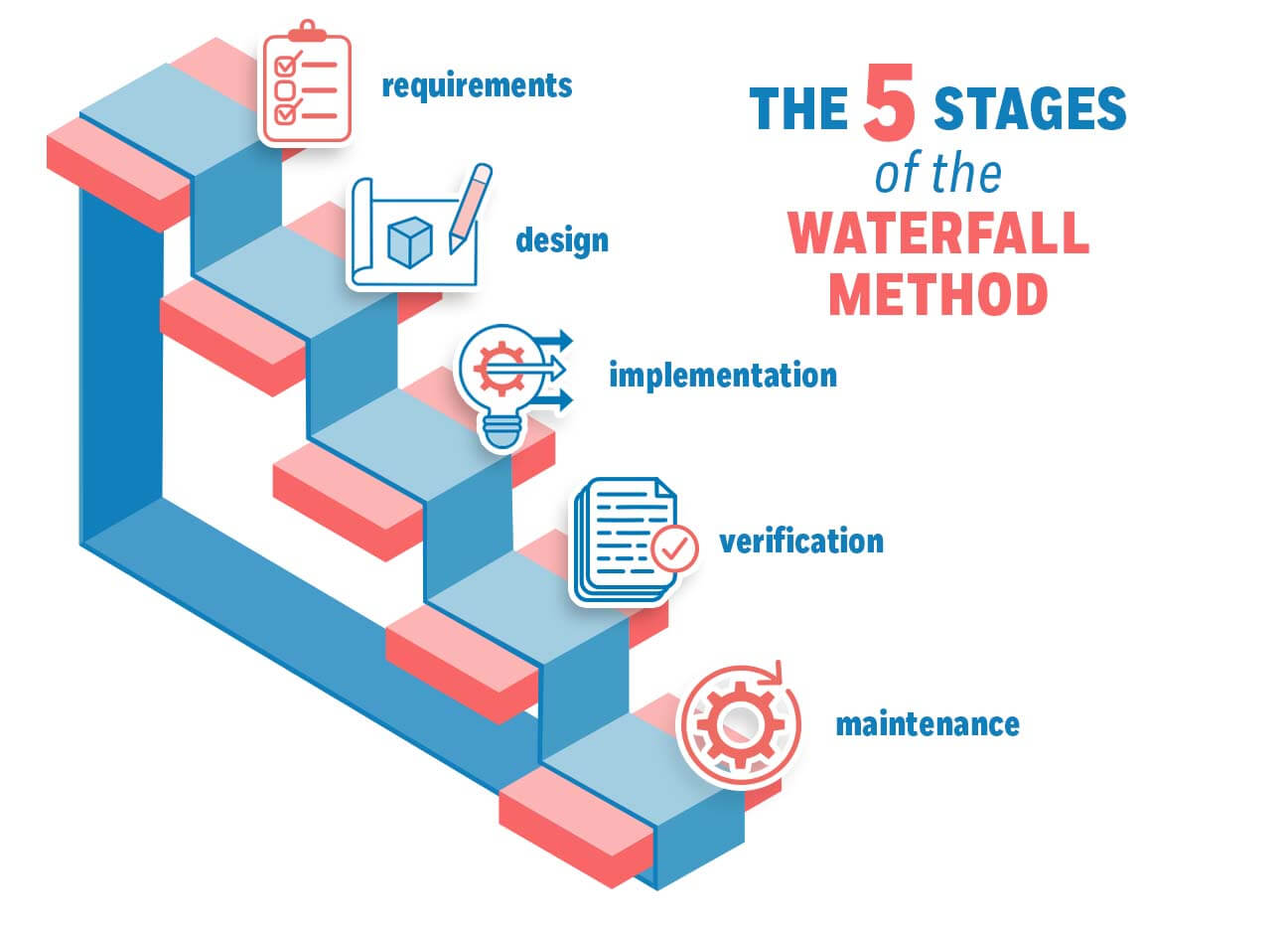
- The original, classic SDLC model where progress flows in one direction, like a waterfall.
- Best For: Projects where requirements are well-understood, stable, and unlikely to change (e.g., building a bridge).
- All requirements are gathered and "frozen" during the Analysis phase before any coding starts.
- There is very little room for changes or customer feedback until the very end of the project.
Weaknesses of the Waterfall Model
- Very Long Delivery Time: The full cycle can take months or years to deliver a final product.
- Delayed Feedback: Working software is not seen by the client until late in the cycle, which can hide major design flaws.
- Inflexible to Change: A change in requirements often means starting over from the beginning, leading to major cost and time increases.
- High Risk: If the initial requirements are wrong, the entire project can be a failure.
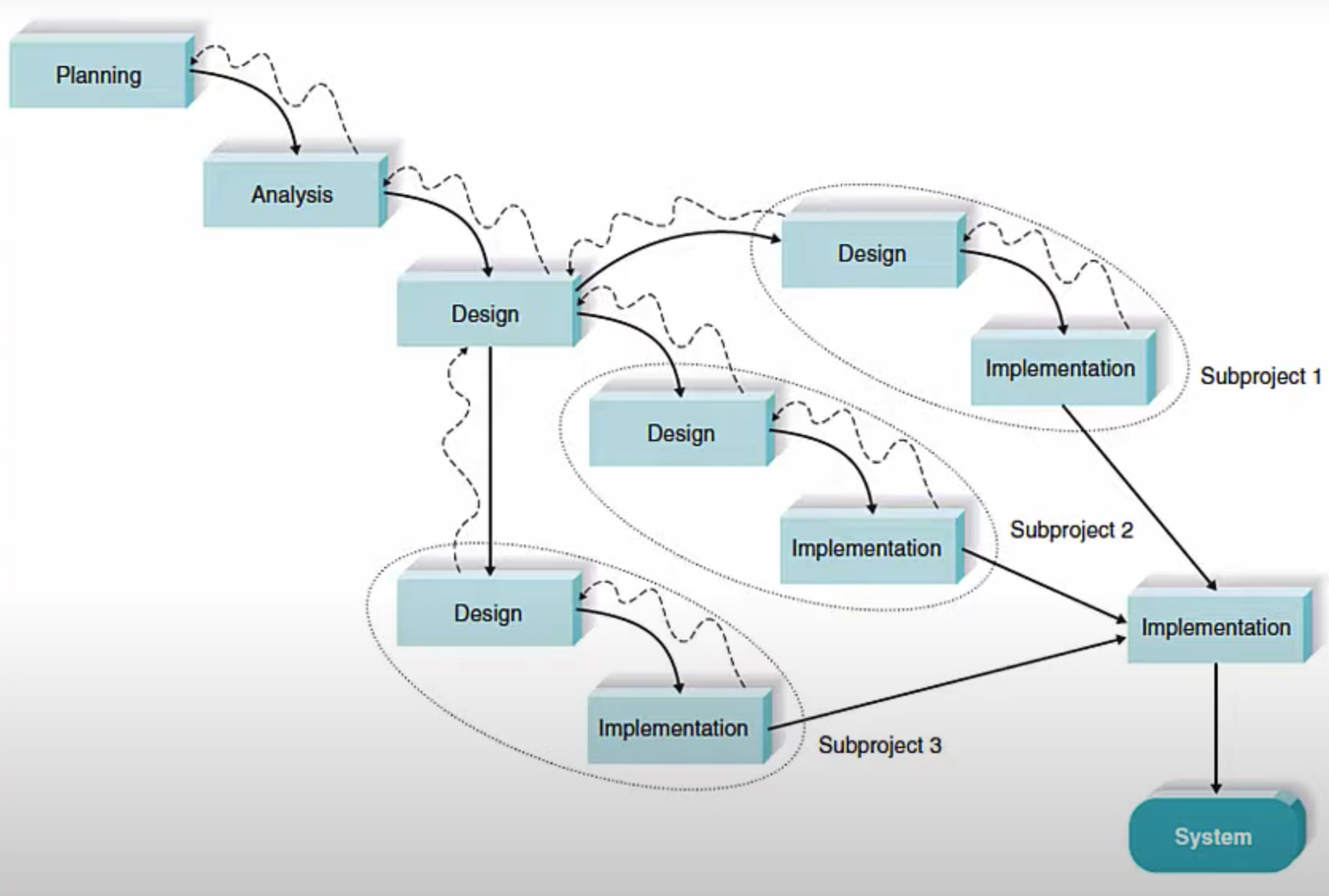
Parallel Development Model
- An evolution of the Waterfall model designed to save time.
- After the analysis phase, the project is split into several independent sub-projects.
- These sub-projects are designed and implemented in parallel by different teams.
- Challenge: Requires careful planning to ensure sub-projects are truly independent. Integrating them all at the end can be complex and introduce new bugs.
The V-Model
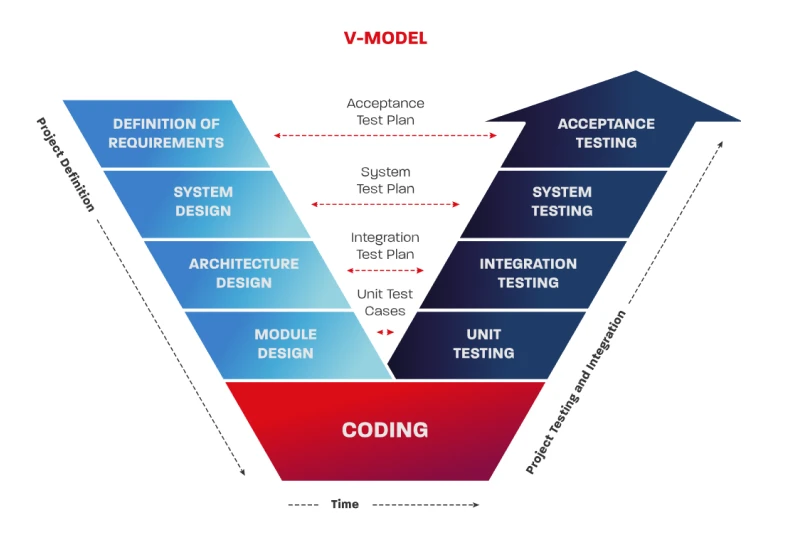
- Also known as the Verification and Validation model, it puts a heavy emphasis on testing.
- It links each development stage directly to a corresponding testing stage.
- For every phase on the left side of the 'V' (e.g., System Design), a testing plan is created on the right side (e.g., System Testing).
- This improves quality by catching defects early, but it remains as rigid and inflexible as the Waterfall model.
V-Model Example: Sending Money to a Friend
Verification = "Are we BUILDING it right?"
Each step plans how the app will work — before any code is written.
deduct(balance, amount) → returns $100 − $20 = $80Validation = "Did we BUILD the RIGHT thing?"
Each check tests whether the finished feature actually works as planned.
deduct(100, 20) → does it return exactly 80?Limitations of Structured Approaches
- Core Problem: Rigidity. All structured approaches assume that requirements are stable and perfectly understood from the start.
- Poor Fit for Modern Business: They are not well-suited for today's dynamic business environments where market needs can change overnight.
- Delayed Value: No business value is delivered until the project is fully complete.
- A change in requirements late in the project is often disastrous, leading to significant delays and budget overruns.
Why So Many Approaches?
There is no single "best" method. The right choice depends entirely on the project's unique needs and characteristics:
Requirement Stability
Are the requirements clear and stable, or vague and likely to change?
- Stable: Use structured models (e.g., medical device software).
- Evolving: Use RAD or Agile (e.g., e-commerce features).
User Availability
How much time can clients or end-users spend giving feedback?
- Low (Sign-off only): Structured (gather rules upfront).
- High (Continuous): RAD / Agile (review weekly prototypes).
Technical Risk
Are we using new, unfamiliar technology or standard tools?
- High Risk: Use Prototyping (RAD) to test code feasibility early.
- Low Risk: Traditional SDLC methods are perfectly fine.
Part 2: Rapid Application Development (RAD)
A Faster, More Flexible Way to Build Software
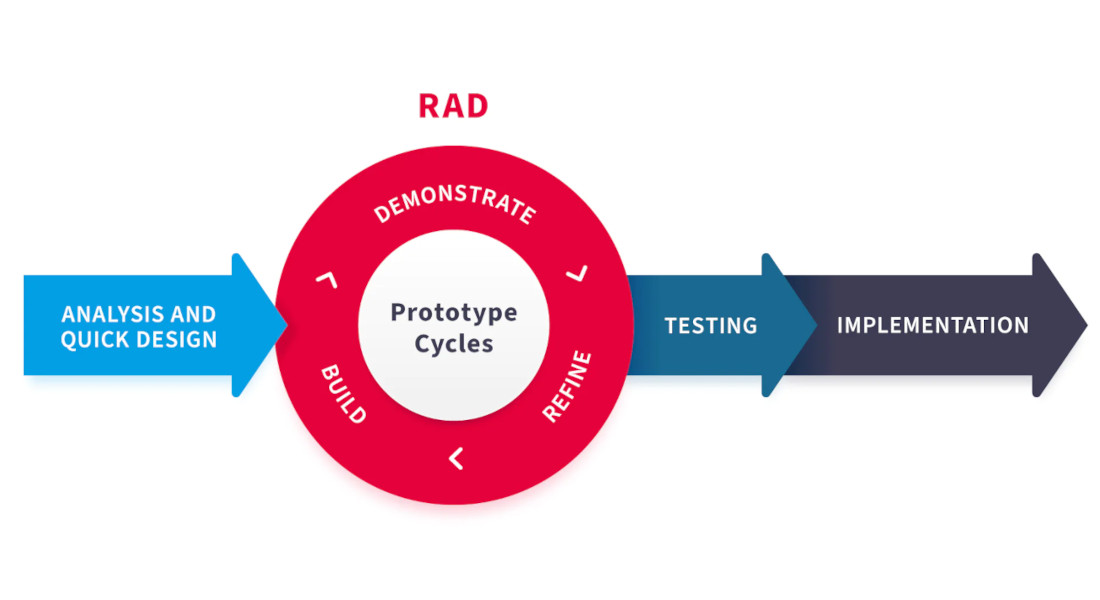
The RAD Methodology Cycle
- Define Requirements: Gather a rough list of requirements in collaborative sessions (JAD).
- Prototype: Quickly build a working model (a prototype) that demonstrates the key features.
- Gather Feedback: Show the prototype to the client and users to get their input.
- Incorporate & Iterate: Refine the prototype based on feedback. This loop repeats until the client is satisfied.
- Deliver: Finalize and optimize the approved prototype and deliver the finished product.
What is RAD?
- A response to the frustration with slow, rigid waterfall methods from the 1980s.
- Core Principle: "Software is more like clay, not steel." It should be malleable and easy to change during development.
- Focuses on developing systems quickly through frequent iterations, prototypes, and user feedback.
- Embraces changing requirements, even late in the development cycle.

Key RAD Techniques & Tools
- CASE Tools: Software packages that help automate and manage the development process (e.g., Enterprise Architect, IBM Rational Rose, ERwin Data Modeler, Visual Paradigm).
- JAD Sessions: Intensive workshops where users and developers collaborate to define requirements (supported by digital collaborative whiteboards like Miro, Mural, or MS Teams).
- Visual Programming: Tools that allow for drag-and-drop UI creation to speed up development (e.g., Bubble, OutSystems, Mendix, Microsoft Power Apps).
- Prototyping: Creating working models of the application to gather early user feedback (e.g., Figma, Balsamiq, Adobe XD, InVision).
- Code Generators: Tools that automatically write boilerplate or repetitive code (e.g., Swagger/OpenAPI Generator, AWS Amplify, Yeoman, GitHub Copilot).
RAD Approach 1: Iterative Development
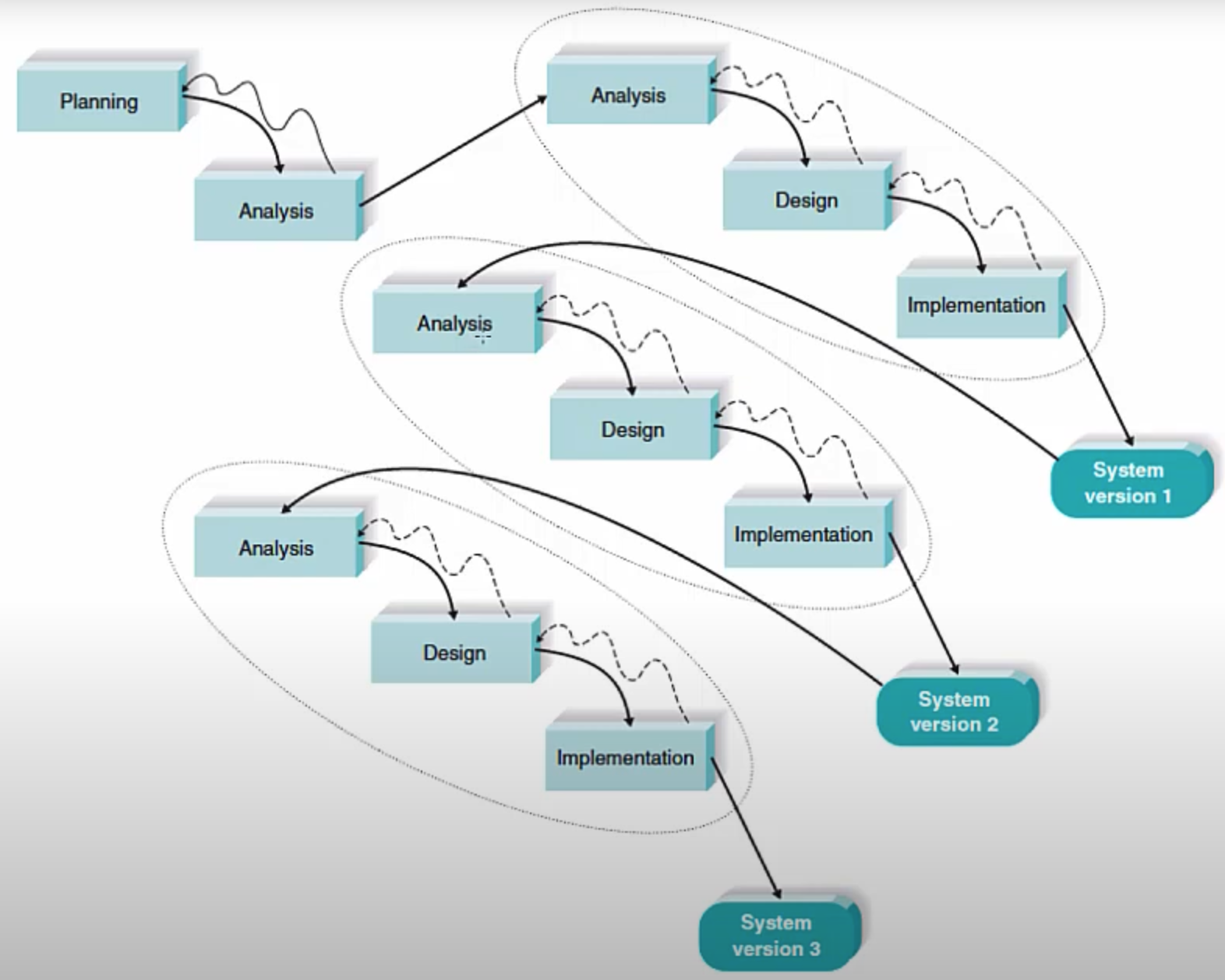
- The overall system is built in a series of versions, or "iterations."
- The first iteration includes only the most critical, core features.
- Each subsequent iteration adds more features based on user feedback from the previous version.
- It's like a set of mini-waterfall projects that build on each other.
- Problem: Users receive an incomplete system at first and must be patient for the final, feature-complete version.
RAD Approach 2: System Prototyping
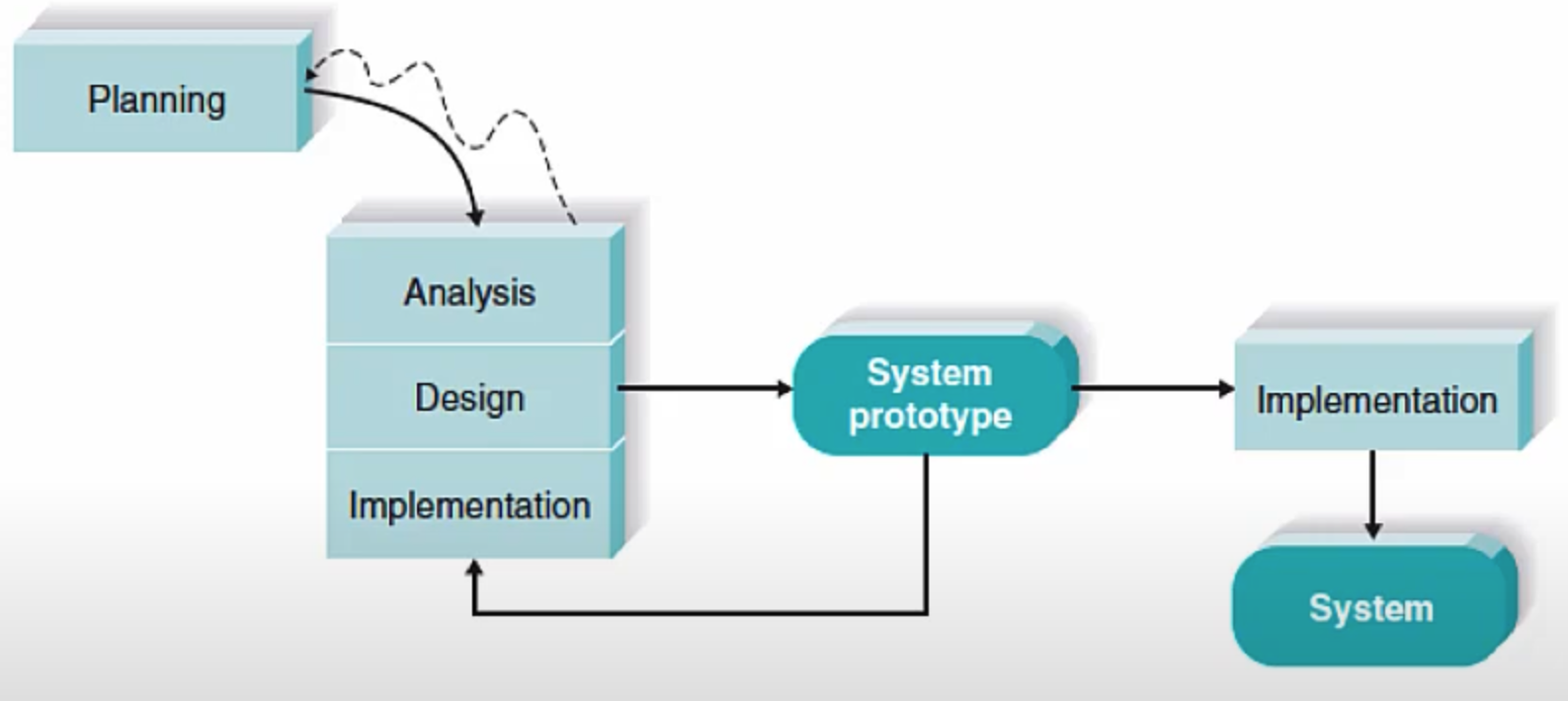
- A preliminary, working model of the system is built quickly.
- This prototype is used to gather user feedback and clarify requirements.
- The prototype is then gradually improved and refined until it evolves into the final system.
- Benefit: Users can see and interact with a tangible system very early on.
- Challenge: The initial simple design might make it difficult to add complex features later.
Agile Development
- A modern philosophy that contains a group of methodologies (e.g., Scrum, Kanban, XP).
- Prioritizes individuals and interactions over processes and tools.
- Values working software over comprehensive documentation.
- Emphasizes customer collaboration and responding to change over following a rigid plan.
- Work is done in small, manageable increments called "sprints" or "iterations."
RAD vs. Agile: What's the Difference?
RAD is a specific prototyping methodology focused on building things quickly. Agile is a broader philosophical mindset for team collaboration.
Rapid Application Development (RAD)
- Core Focus: Speed and the product prototype cycle.
- Process: Build prototype → get feedback → edit prototype → repeat → deliver.
- Team Style: Informal, small developer group collaborating directly with the client.
- Example Scenario: A solo developer uses low-code tools (Bubble/Figma) to build and refine a new delivery app prototype for a local restaurant in 2 weeks.
Agile Development (Scrum/Kanban)
- Core Focus: Sustainable delivery and team culture.
- Process: Sprints (2-week increments), daily standups, review meetings, and retrospectives.
- Team Style: Structured roles (Scrum Master, Product Owner, Devs, QA).
- Example Scenario: An 8-person team at a bank works in 2-week sprints to continuously add security patches and small features to an existing mobile banking app.
Advantages of RAD
- Speed & Lower Cost: Faster development cycles and reduced rework lead to lower costs.
- Flexibility & Adaptability: Changes are expected and can be easily incorporated at any stage.
- Higher User Satisfaction: Constant user involvement ensures the final product meets their actual needs.
- Reduced Risk: Key risks are identified early through prototyping, not at the end of the project.
Disadvantages of RAD
- Doesn't Scale Well: Can be chaotic and hard to manage with very large teams and complex projects.
- Requires High Commitment: Needs significant and consistent time commitment from both developers and clients for feedback sessions.
- Interface Focus: The focus on the user interface can sometimes lead to neglecting backend architecture and technical quality.
- Not for All Projects: Unsuitable for projects with a high degree of technical risk or for mission-critical systems.
When is RAD a Good Fit?
Good for:
- Projects with unclear or evolving requirements.
- Smaller, modularized projects.
- Internal business tools or customer-facing web portals.
- When there's a need to deliver a functional system quickly.
Not so good for:
- Life-or-death, mission-critical systems (e.g., flight controls).
- Large-scale projects that require many developers.
- Projects where the client is unavailable for frequent feedback.
- Systems with complex technical requirements that cannot be easily prototyped.
Tools that Enable RAD
- Design & Prototyping Tools: Figma, Sketch, and Adobe XD allow for creating interactive mockups that look and feel like a real application.
- User Testing & Feedback Platforms: Tools like UserTesting.com and InVision allow for capturing remote user feedback on prototypes.
- Low-Code/No-Code Platforms: Platforms like OutSystems or Microsoft Power Apps bundle development tools to build and deploy applications with minimal hand-coding.
Conclusion
RAD is a powerful approach for the right project.
It prioritizes speed, flexibility, and user feedback to deliver valuable software faster and more effectively than traditional methods, ensuring the final product is what the user truly needs.
Check out the following example: Example Project