Understanding Switches
Layer 2 switching, VLANs, and practical segmentation
Introduction to Computer Networks — Switches section
Roadmap
Switching basics
Switches, hubs, frames, collision domains, broadcast domains, and CSMA/CD.
How switches decide
MAC learning, unknown-unicast flooding, forwarding, and aging.
Managed switch features
VLANs, Layer 3 switches, port mirroring, PoE, and Lab 10.
Why switches matter
- Most wired LAN devices connect through switches.
- A switch gives every connected host a dedicated path into the LAN.
- It forwards Ethernet frames using MAC addresses.
- Managed switches add control: VLANs, monitoring, PoE, and more.
Switch vs hub
Hub
- Repeats bits out every port.
- All devices share one collision domain.
- No MAC address table.
- Mostly obsolete today.
Switch
- Learns where MAC addresses live.
- Forwards frames only where needed.
- Each port is its own collision domain.
- Foundation of modern Ethernet LANs.
Switches work at Layer 2
- Layer 2 is the Data Link layer.
- The Layer 2 address is the MAC address.
- A switch reads Ethernet frame headers.
- It does not need to inspect IP addresses to switch local traffic.
The switch reads the frame
- Source MAC: where the frame came from.
- Destination MAC: where the frame should go.
- Payload: usually carries an IP packet.
Collision domains
- A collision domain is a place where two devices could transmit at the same time and collide.
- Old hubs made all connected devices share one collision domain.
- A switch breaks the LAN into one collision domain per port.
- Full-duplex links remove the practical collision problem.
Full duplex eliminates collisions
- Collisions don't occur on switches using full duplex mode:
- There's a dedicated channel for concurrent sending and receiving data.
Broadcast domains
- A network segment where all devices receive ethernet broadcast messages (one-to-all) from each other.
- Example protocols: ARP, DHCP
- Hubs and switches forward broadcasts; routers do not.
- Broadcasts are inefficient and resource-intensive.
- If routers forwarded broadcasts, WAN performance would collapse due to broadcast storms.
CSMA/CD
- CSMA/CD: Carrier Sense Multiple Access with Collision Detection
- Used on a shared network medium to help reduce data collisions.
- Helps hosts decide when to send data and also detect collisions
- Used with hubs (multi-port repeaters) where there is one large collision domain.
- Used with switches ONLY in half-duplex mode.
Carrier Sense
Listen first — is the medium free before transmitting?
Multiple Access
Many hosts share the same physical medium.
Collision Detection
If two signals collide, stop, send a jam signal, and retry after a random backoff.
CSMA/CD Process
CSMA/CD & CSMA/CA Explained — PowerCert Animated Videos
Managed vs unmanaged switches
| Unmanaged | Managed |
|---|---|
| Plug in devices and it works. | Administrator can configure behavior. |
| Common in homes and very small offices. | Common in business and enterprise networks. |
| No VLAN control or monitoring features. | Supports VLANs, port monitoring, security, PoE controls, and more. |
- TP-Link TL-SG108 — 8-port unmanaged Gigabit switch, ~$20–25. Plug in and go.
- Netgear GS308 — another popular unmanaged option at a similar price.
- Cisco CBS350 (managed) — business-grade managed switch with VLAN, monitoring, and PoE. ~$150–$350+.
What management unlocks
VLANs
Separate departments or roles on one physical switch.
Visibility
Inspect port status, MAC tables, statistics, and mirrored traffic.
Policy
Control ports, power, priority, and security settings.
How a switch learns MAC addresses
- A frame enters a switch port.
- The switch reads the source MAC address.
- It records: this MAC lives on this port.
- Then it checks the destination MAC.
- If known, forward to one port. If unknown, flood inside the VLAN.
How a switch learns MAC addresses — step-by-step tutorial
Interactive: MAC learning stepper
MAC address table
| MAC | Port |
|---|---|
| - | - |
| - | - |
The switch learns from the source MAC of incoming frames.
MAC tables age out
- Switches do not keep learned entries forever.
- Inactive MAC entries age out after a timeout.
- This lets the table adapt when devices move to different ports.
- If the destination becomes unknown again, the switch floods until it relearns.
Quiz: switching fundamentals
VLANs and managed features
One physical switch can support multiple logical LANs.
VLANs: LANs within LANs
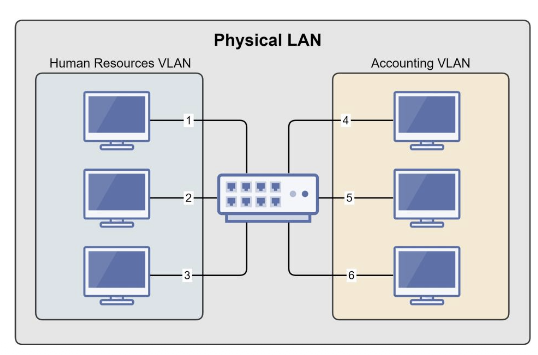
- Essentially LANs within a LAN
- Physical Switch → Multiple Virtual Switches
- Break up a large “physical” LAN into several smaller “logical” LANs.
- Accomplished with managed switches.
- Assign specific switch interfaces (ports) to specific virtual LANs.
- Human Resource VLAN (Interfaces 1, 2, 3)
- Accounting VLAN (Interfaces 4, 5, 6)
- Benefits of VLANs
- Reduces Broadcast Domains
- Segments Network by Role
- Increases Security
- Devices Cannot Communicate with Other VLANs
- Group Devices by Need, Not Physical Location
Port-based VLANs
| Switch port | Assigned VLAN | Department | Behavior |
|---|---|---|---|
| Port 1 | 20 | Sales | Talks inside Sales VLAN |
| Port 2 | 20 | Sales | Talks inside Sales VLAN |
| Port 3 | 10 | HR | Talks inside HR VLAN |
| Port 4 | 10 | HR | Talks inside HR VLAN |
VLANs split broadcasts
- Broadcasts in VLAN 10 stay in VLAN 10.
- Broadcasts in VLAN 20 stay in VLAN 20.
- This reduces unnecessary traffic.
- It also supports security and operational separation.
VLANs with multiple switches
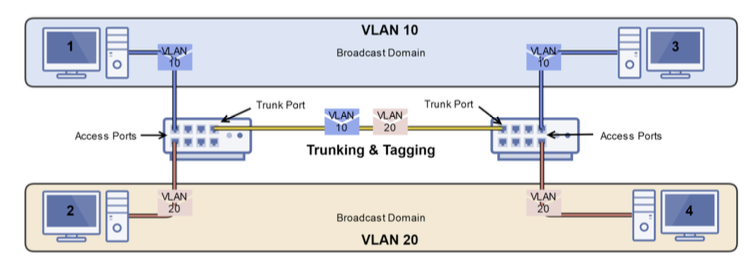
- Trunk Ports: Creates a connection between two switches (trunk link) for VLAN traffic to traverse for multiple VLANs.
- Access Ports: Ports configured for use for a single VLAN.
- Tagging (802.1Q): Ethernet frames are tagged with their respective VLAN ID when traversing trunk ports to ensure proper delivery.
- Untagged Frames: If a frame isn’t tagged with a VLAN ID, switch trunk ports can be configured with a native VLAN, to which the untagged frame will be sent.
VLANs do not route by themselves
- VLAN 10 and VLAN 20 are separate Layer 2 networks.
- A Layer 2 switch will not move traffic between them.
- Cross-VLAN pings will fail without a router or Layer 3 switch.
- To communicate between VLANs, add routing.
Layer 3 switches
- Provide Layer 2 Switching & Layer 3 Routing.
- OSI Layer 2 (Data Link): Switching
- MAC Addresses
- OSI Layer 3 (Network): Routing
- IP Addresses
- OSI Layer 2 (Data Link): Switching
- Managed Switch Capability
- Used in Conjunction with VLANs
- Provides:
- VLAN Switching
- IP Routing between VLANs
- One Device Instead of Router & Switch
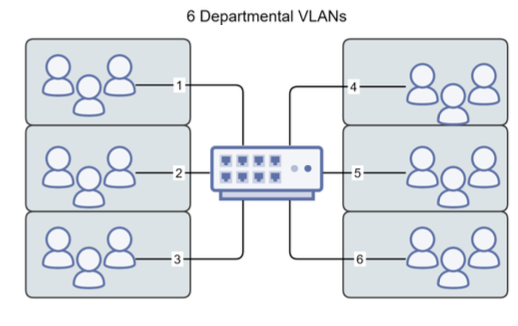
When departments should communicate
Without routing
VLAN 10 and VLAN 20 are isolated. Segmentation is the goal.
With Layer 3
A router or Layer 3 switch can forward between VLANs, often with policy or firewall rules.
Port mirroring
- Also called SPAN on Cisco switches.
- Copies traffic from one or more source ports.
- Sends the copy to a monitoring port.
- Useful for Wireshark, IDS, troubleshooting, and learning.
Power over Ethernet
- PoE sends power and data over the same Ethernet cable.
- Common for IP phones, wireless access points, and cameras.
- A PoE switch can power devices without a nearby wall outlet.
- The switch has a total power budget.
PoE power budget
| Device | Power need | Count | Total |
|---|---|---|---|
| IP phones | 7 W | 8 | 56 W |
| Access points | 18 W | 4 | 72 W |
| Cameras | 12 W | 6 | 72 W |
| Needed | 200 W |
Quiz: choose the switch feature
| Scenario | Best feature |
|---|---|
| Separate HR and Sales on one physical switch. | |
| Copy traffic to a Wireshark laptop for troubleshooting. | |
| Power cameras without separate electrical outlets. | |
| Route between VLANs inside the campus LAN. |
Switch design checklist
Ask first
- Who needs to communicate?
- Who should be isolated?
- Which devices need power?
- What traffic should be monitored?
Then choose
- Unmanaged or managed switch.
- VLAN plan and port assignments.
- Layer 3 routing policy.
- PoE budget and monitoring ports.
Common mistakes
In the lab
- Assigning the wrong switch port.
- Forgetting to create the VLAN first.
- Testing the wrong target IP.
- Expecting cross-VLAN pings to work.
In concepts
- Confusing collision and broadcast domains.
- Thinking VLANs route automatically.
- Thinking a switch uses IP addresses for Layer 2 forwarding.
- Forgetting that unknown unicast is flooded.
Key takeaways
Switching
- Switches forward frames using MAC addresses.
- They learn from source MAC addresses.
- Unknown destinations are flooded inside the VLAN.
- Each switch port is its own collision domain.
Managed features
- VLANs split broadcast domains.
- Layer 3 switches route between VLANs.
- Port mirroring copies traffic for analysis.
- PoE carries power and data over Ethernet.