Understanding Routers
DE5408 — Intro to Networks — Week 13
Instructor: Reza Farashahi | School of Tech — NZSE
Refresher on Routers
What does a router actually do?
Refresher on Routers
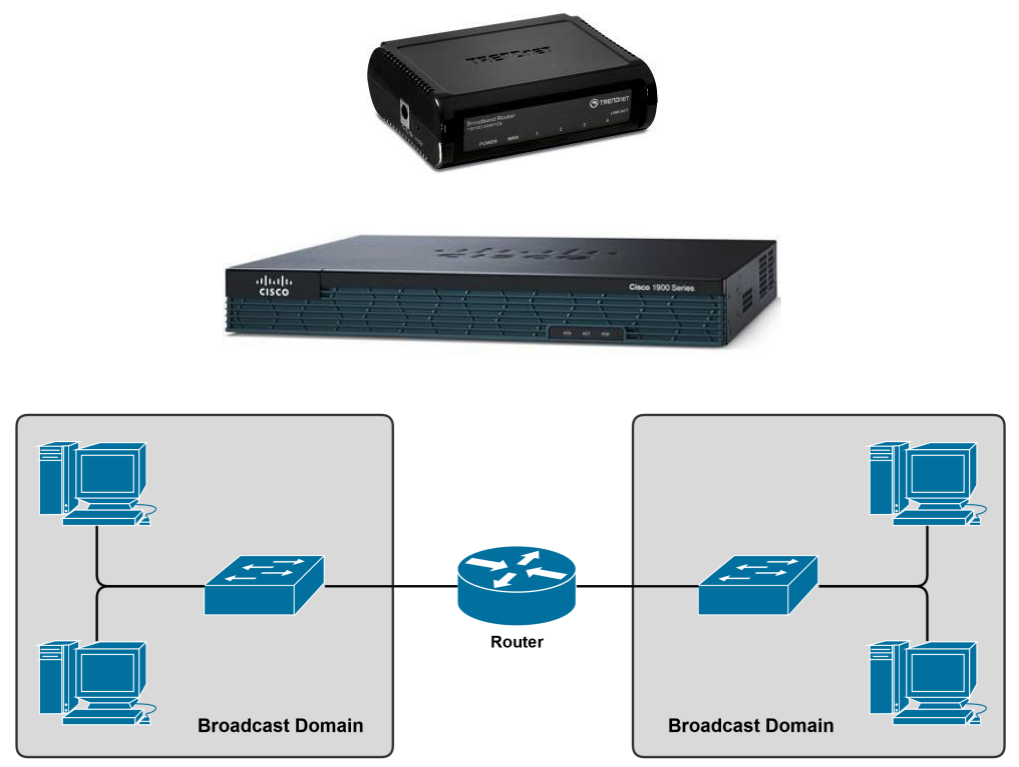
- Used to connect different networks together
- Routes traffic between networks using IP Addresses
- Uses intelligent decisions (Routing Protocols) to find the best path for a packet from source to destination
- Break up Broadcast Domains — each interface is its own broadcast domain
- OSI Layer 3 Device
- Layer 3 = Router
- Layer 2 = Switch
- Layer 1 = Hub
Quick Quiz — Routers
Q1: At which OSI layer does a router operate?
Q2: What do routers use to make forwarding decisions?
The Routing Process
How does a packet travel from source to destination?
Step 1: The Routing Process
- PC1 creates a packet destined for PC2
- Source IP: 192.168.1.2/24
- Destination IP: 192.168.0.2/24
- Destination is on a different network → packet sent to PC1’s default gateway
- Default gateway = Router 1’s Ethernet interface (
192.168.1.1/24) - If PC1 doesn’t know Router 1’s MAC address → PC1 sends an ARP request

Step 2: The Routing Process
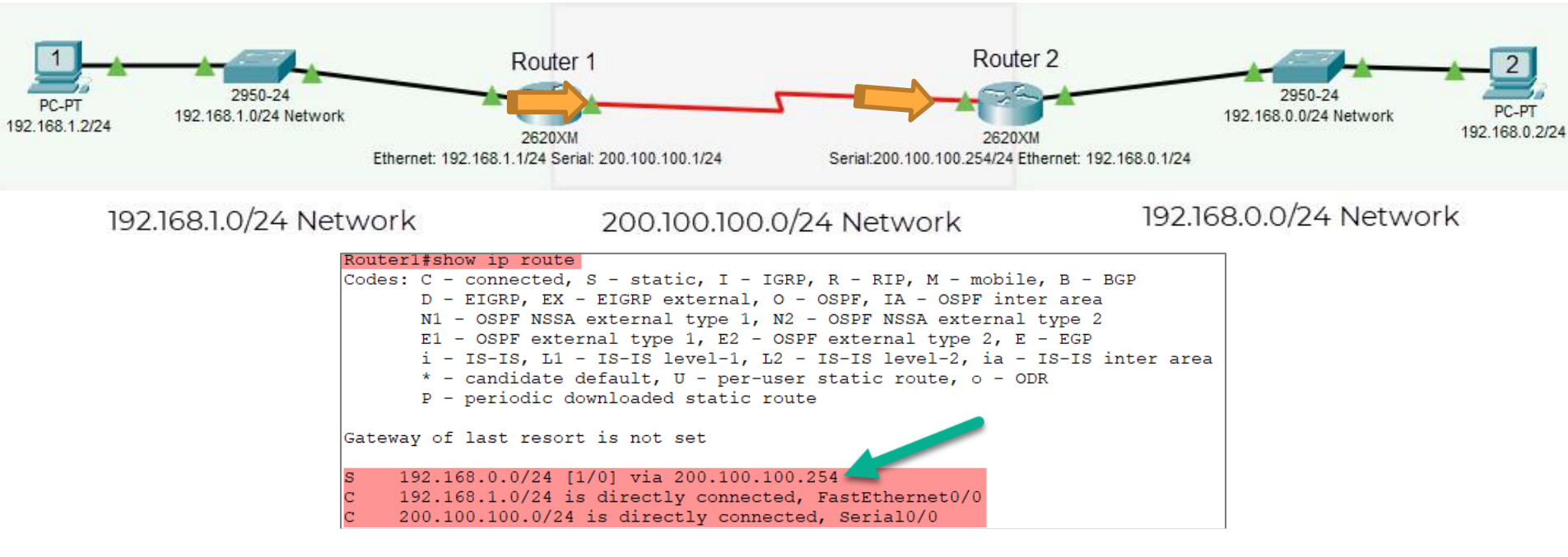
- Router 1 receives the packet and inspects the destination IP (192.168.0.2)
- Router 1 looks up its routing table to decide where to forward it
- The matching entry:
S 192.168.0.0/24 [1/0] via 200.100.100.254 - This is a static route — it sends the packet out the serial interface (
200.100.100.1/24) toward Router 2
Step 3: The Routing Process
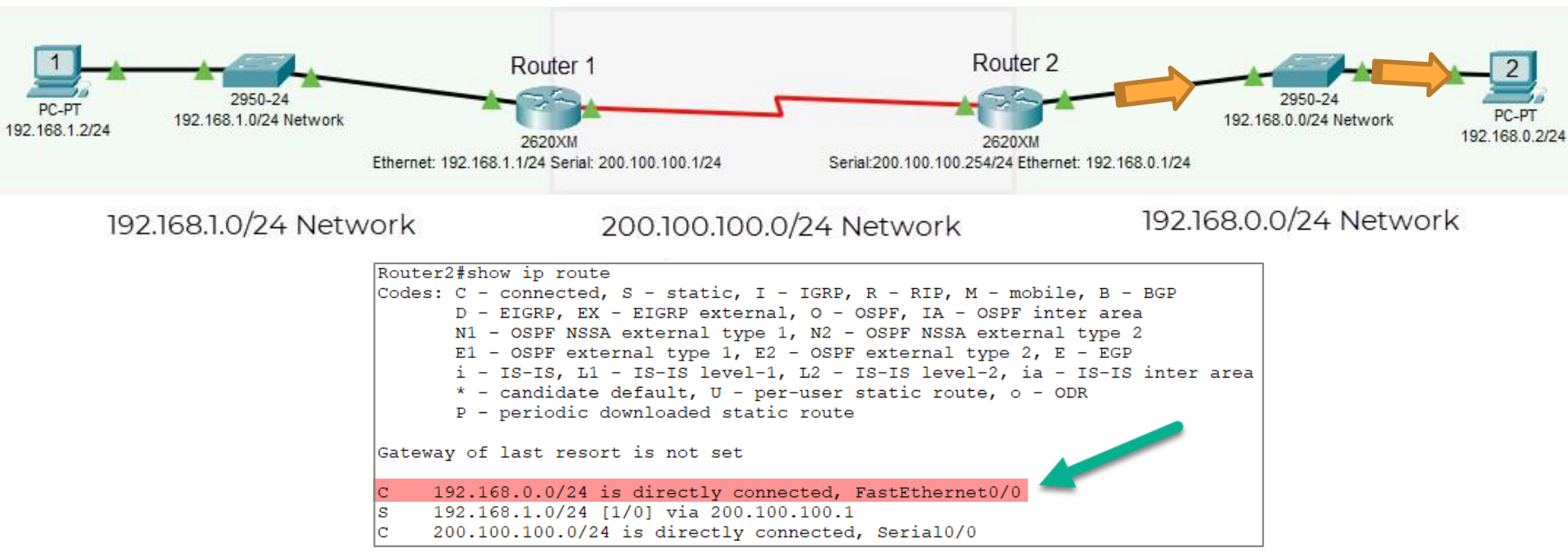
- Router 2 receives the packet and inspects the destination IP (192.168.0.2)
- It looks up its routing table and finds:
C 192.168.0.0/24 is directly connected, FastEthernet0/0 - Directly connected — Router 2 can deliver the packet straight to PC2
- Router 2 uses ARP to find PC2’s MAC and delivers the packet ✅
📶 Routing Process — Live Walkthrough
🔁 MAC addresses rewritten at every router hop • ✔ IP addresses remain constant end-to-end
Quiz — The Routing Process
Q1: What is a default gateway used for?
Q2: In the routing table, what does C stand for?
Q3: Why does Router 1 not need to know the full path to PC2?
Static vs. Dynamic Routing
Two ways to populate a routing table
Static vs. Dynamic Routing
Routing can be broken into two primary categories:
✍ Static Routing
- Routes manually entered by administrator
- Does not change automatically
- Best for small, simple networks
- Low overhead, but high admin effort
⚙️ Dynamic Routing
- Routes learned automatically via protocols
- Adapts to network changes
- Best for large, complex networks
- Higher overhead, but hands-off
Static Routing
- The simplest form of routing
- Routes are manually entered by a network administrator
- Ideal for small networks with very few routes that rarely change
- No routing protocol overhead
- Problematic for larger or changing networks
- All changes must be made manually
- Time-consuming and error-prone
ip route 192.168.0.0 255.255.255.0 200.100.100.254
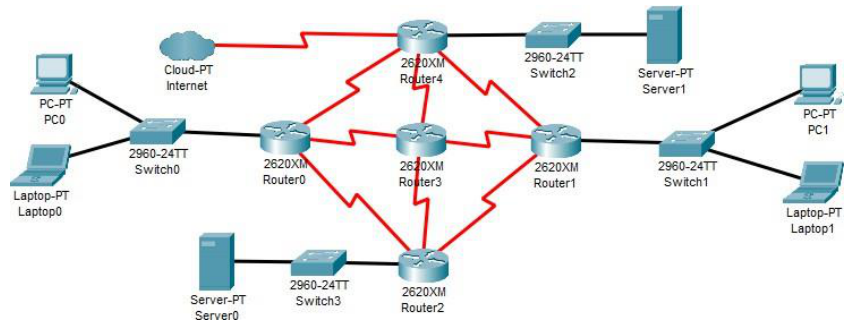
Dynamic Routing
- Uses routing protocols to automatically:
- Populate the router’s routing table
- Make the most efficient routing decision
- Update the routing table when the network changes
- Automatic & Hands-Off — all decisions handled by the protocol
- Ideal for larger, more complex networks
Types of Dynamic Routing Protocols
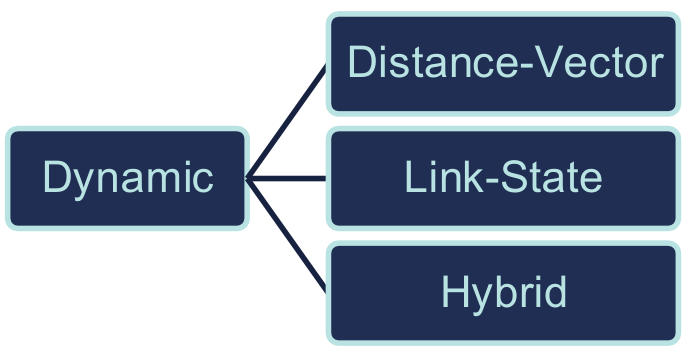
There are three types of dynamic routing protocols:
- Distance-Vector
- Use hop count as metric (e.g. RIP, EIGRP)
- Share routing table with direct neighbours
- Link-State
- Build a complete map of the network (e.g. OSPF)
- Share link-state advertisements (LSAs) with all routers
- Hybrid
- Combines features of both (e.g. EIGRP is sometimes classified here)
Quiz — Static vs. Dynamic Routing
Q1: A network admin manually types ip route commands on every router. Which type of routing is this?
Q2: Which scenario is best suited for static routing?
Q3: Which routing type automatically updates the routing table when a network link fails?
IGPs & EGPs
Interior vs. Exterior Gateway Protocols
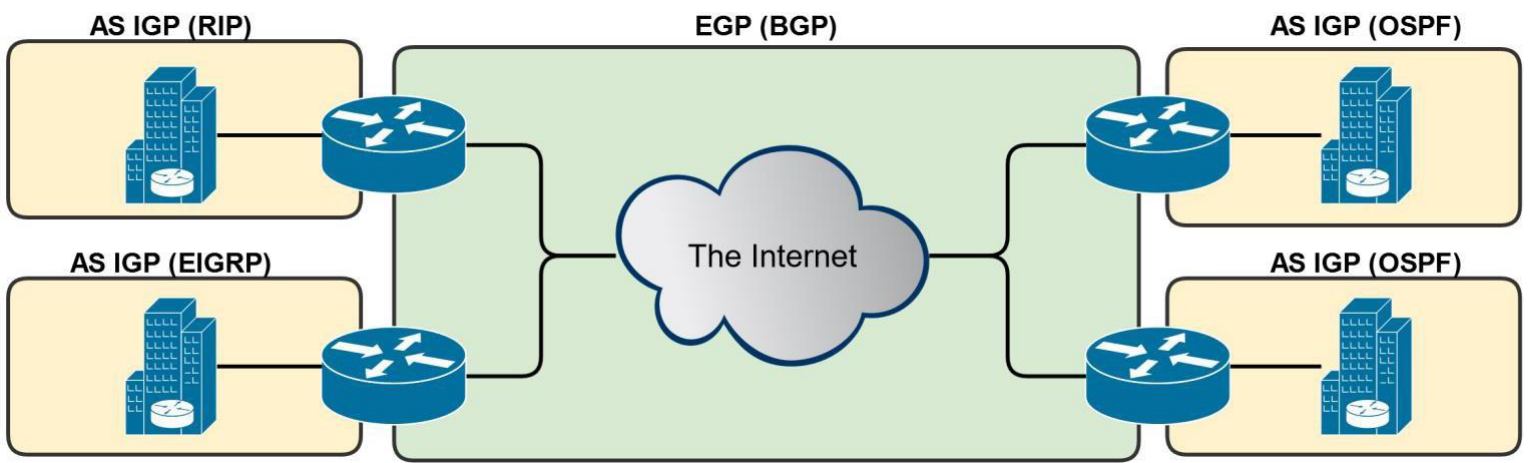
AS — Autonomous System
- Autonomous = Independent Entity (Organisation)
- University, Corporation, Government Agency
- Routers are usually part of an Autonomous System (AS)
- IP routes under common administrative control
- An AS is a connected group of one or more IP prefixes run by one or more network operators with a single, clearly defined routing policy
- Key reference point for understanding IGP and EGP
IGP — Interior Gateway Protocol
- Used within a single AS (your organisation)
- Not designed to route between Autonomous Systems
- That’s the job of EGPs
- IGP Protocols:
- RIP Routing Information Protocol
- OSPF Open Shortest Path First
- EIGRP Enhanced Interior Gateway Routing Protocol
EGP — Exterior Gateway Protocol
- Used to route between Autonomous Systems
- Used by Internet Service Providers (ISPs)
- BGP (Border Gateway Protocol)
- The only EGP in widespread use today
- Almost all ISPs use BGP as their EGP
Quiz — IGPs & EGPs
Q1: Which protocol is used to route traffic between different ISPs on the Internet?
Q2: A company’s internal network uses OSPF to share routes between its routers. What category does OSPF fall into?
Interior Gateway Protocols
RIP — EIGRP — OSPF
Interior Gateway Protocols (IGPs)
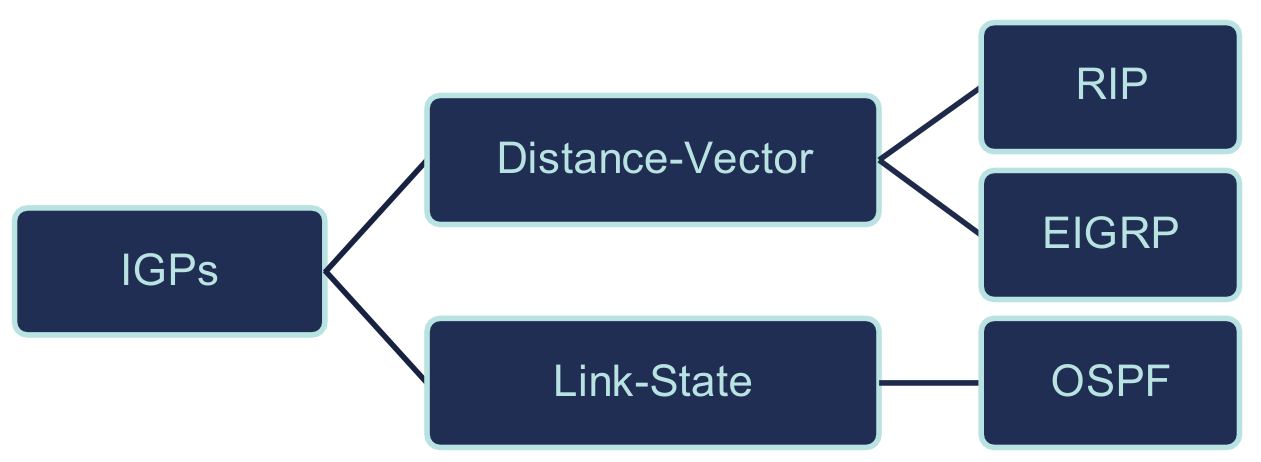
There are three types of IGPs:
- Distance-Vector
- Metric = Hop count (number of routers traversed)
- Shares routing tables with neighbours every interval
- Protocols: RIP EIGRP
- Link-State
- Builds a complete topology map using LSAs
- Faster convergence; scales to large networks
- Protocol: OSPF
Distance-Vector Routing
- Uses distance as the metric for routing decisions
- Distance = Hop Count
- Hops = number of routers a packet passes through
- Each router shares its routing table with directly connected neighbours
- Routers only know distances — they don’t have a full map of the network
- Distance-Vector protocols:
- RIP Routing Information Protocol
- EIGRP Enhanced IGRP

RIP — Routing Information Protocol
- A long-established distance-vector protocol (3 versions)
- Maximum 15 hops to prevent routing loops
- Does not scale well for large networks
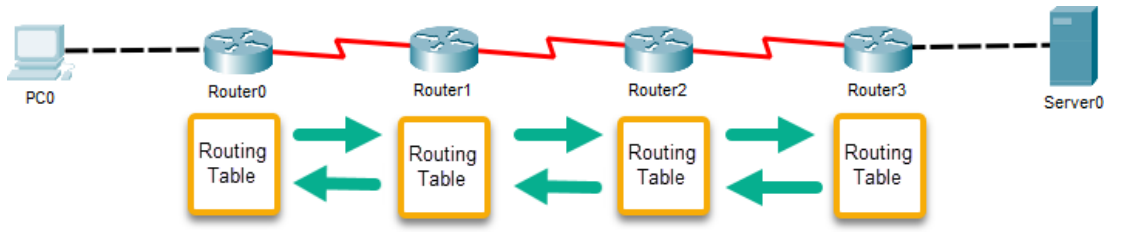
- Sends a full copy of its routing table to directly connected neighbours every 30 seconds
- Slow convergence — Router 3 may wait up to 90s to learn Router 0’s routes
- Generates unnecessary traffic and high CPU utilisation
EIGRP — Enhanced IGRP
- A Cisco proprietary protocol — only works on Cisco routers
- Not a pure distance-vector protocol — also uses reliability, bandwidth, load, and delay as metrics
- Often called an advanced distance-vector or hybrid protocol
- Default hop count of 100, maximum of 255
- Supports classless routing and VLSM
- Very fast convergence and highly scalable for large networks
Link-State Routing
- Builds a complete map of the entire network
- Uses Link-State Advertisements (LSAs) to share information:
- Routers flood LSAs to all other routers
- Each router builds an identical topology map
- After the initial map is built, routers only communicate when the network changes
- Otherwise, just periodic “hello” packets to confirm neighbours are alive
- Results in faster convergence and better scalability
- Protocol: OSPF Open Shortest Path First
OSPF — Open Shortest Path First
- Open standard link-state routing protocol
- Well-suited for large networks with multiple redundant paths
- Builds a shortest-path tree (SPF tree) to determine best routes
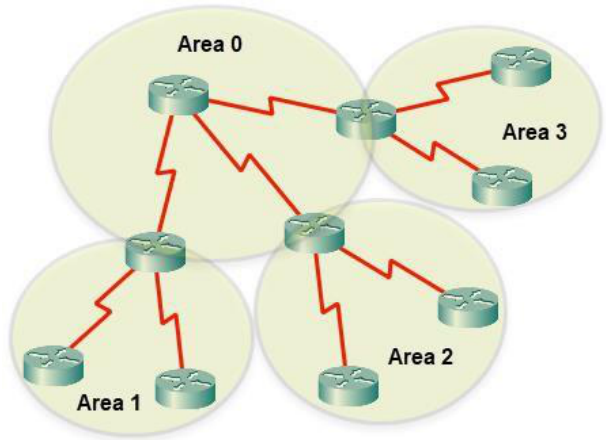
- Divides larger networks into areas to reduce update traffic
- Area 0 = Backbone area (all other areas must connect to it)
- Uses “cost” metric based on link speed and state
- Supports classless addressing and VLSM
- Unlimited hop count
Quiz — Routing Protocols
Q1: Which protocol has a maximum hop count of 15?
Q2: Which protocol is Cisco proprietary and uses bandwidth, delay, reliability, and load as its composite metric?
Q3: OSPF sends a “hello” packet to its neighbours. What is the primary purpose of these hello packets?
Border Gateway Protocol
The routing protocol of the Internet
BGP — Border Gateway Protocol
- The only EGP in widespread use today
- Considered the Internet’s core routing protocol
- Supports IPv4 and IPv6 — highly scalable
- Often called a path-vector (hybrid) routing protocol
- Each ISP is assigned a unique AS number
- Uses AS hops (not individual router hops) as its metric
- Uses the BGP Best Path Selection algorithm to identify the best route
- Routes traffic from AS to AS
- When you connect to the Internet, you move from one AS to another
Routing Tables & Administrative Distance
How routers choose the best route
Routing Table Entries
Routing tables contain three categories of routes:
🔌 Directly Connected
Networks physically attached to a router’s interface. Added automatically when an interface is configured with an IP and is up.
C 192.168.1.0/24 is directly connected, Fa0/0
🌐 Remote Network
Networks not directly attached — reached via another router. Added via static routes or dynamic routing protocols.
S 192.168.0.0/24 [1/0] via 200.100.100.254
🚧 Default Route
Used when no other match is found in the routing table. Acts as the “catch-all” or gateway of last resort. Represented as 0.0.0.0/0 (IPv4) or ::/0 (IPv6).
Routing Table Components
Every entry in a routing table includes at minimum:
| Type | Network / Mask | Interface | Metric | Meaning |
|---|---|---|---|---|
| C Connected | 192.168.1.0/24 | FastEthernet0/0 | 0 | LAN port is directly plugged in — no routing needed |
| C Connected | 200.100.100.0/24 | Serial0/0 | 0 | Serial WAN link is active and directly connected |
| S Static | 192.168.0.0/24 | Serial0/0 | 1 | Admin manually told the router: send this network out Serial0/0 |
| S* Default | 0.0.0.0/0 | Serial0/0 | 1 | Catch-all — used when no other route matches (gateway of last resort) |
0.0.0.0/0) is used.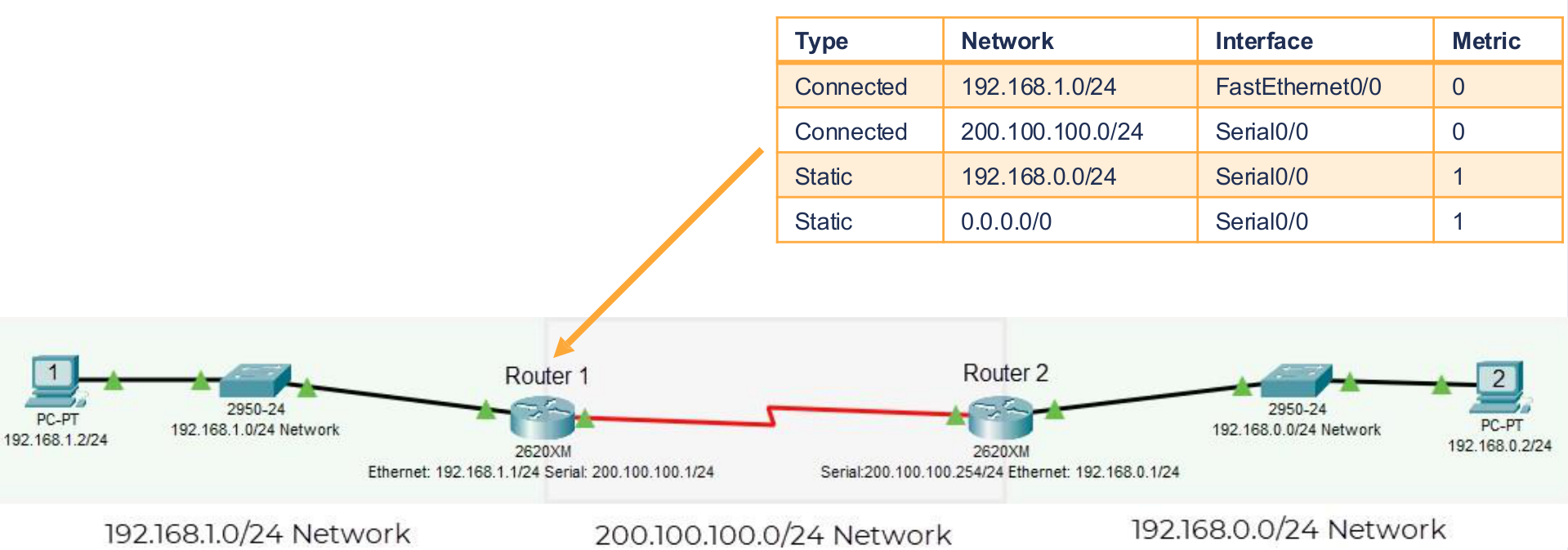
Administrative Distance (AD)
- Used to rate the trustworthiness of a route source
- AD ranges from 0 to 255 — lower is better
- If a router learns the same network from two sources, it picks the one with the lower AD
| Route Source | Default AD | Trustworthiness |
|---|---|---|
| Connected Interface | 0 | 🟢 Highest |
| Static Route | 1 | 🟢 Very High |
| EIGRP | 90 | 🟢 High |
| OSPF | 110 | 🟡 Medium |
| RIP | 170 | 🔴 Lower |
| Unknown / Untrustworthy | 255 | 🔴 Never used |
Quiz — Routing Tables & AD
Q1: A router receives two routes to 10.0.0.0/8 — one via OSPF and one via RIP. Which will it prefer?
Q2: What does an Administrative Distance of 255 mean?
Q3: Type the AD value for a directly connected interface:
The Default Route
The “Gateway of Last Resort”
The Default Route
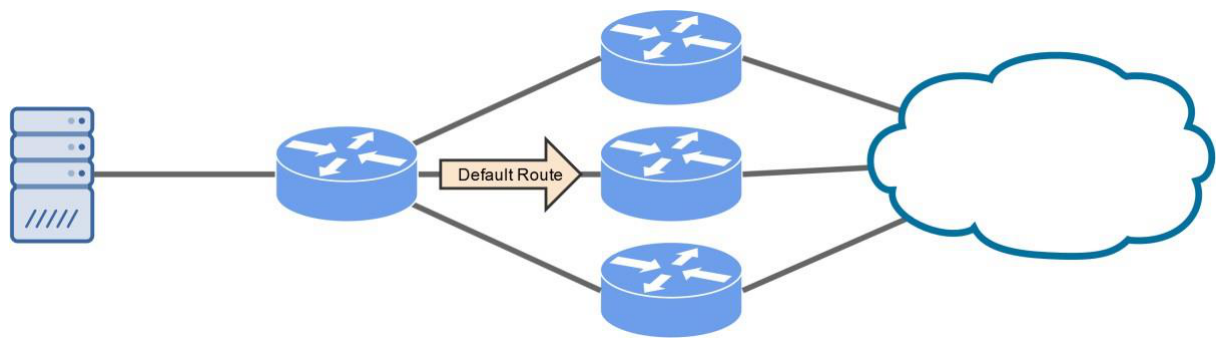
- A static route used when no specific match is found in the routing table
- If there’s no match → forward the packet via the default route
- Commonly called the gateway of last resort
- Represented as:
- IPv4:
0.0.0.0/0 - IPv6:
::/0
- IPv4:
ip route 0.0.0.0 0.0.0.0 [next-hop-IP]This tells the router: “If you don’t know where to send it, send it here.”
🏆 Final Review Quiz
Q1: Which routing protocol has an unlimited hop count and uses “cost” as its metric?
Q2: A packet arrives at a router and no route matches the destination IP. What happens?
Q3: Match the AD value — type the AD for EIGRP:
Week 13 Complete!
Understanding Routers — Key Takeaways
🔌 Routers
Layer 3 devices that connect networks using IP addresses and routing tables
✍ Static vs. Dynamic
Manual vs. automatic route learning — each has trade-offs
🌐 IGP vs EGP
RIP/OSPF/EIGRP within an AS — BGP between AS boundaries
📋 AD & Default Route
AD = route trustworthiness (lower = better). Default = 0.0.0.0/0
NZSE — School of Tech | www.nzse.ac.nz