Introduction to Networks
Week 4 — The OSI Model & IPv4
Reza Farashahi — NZSE
OSI Layer 7
The Application Layer
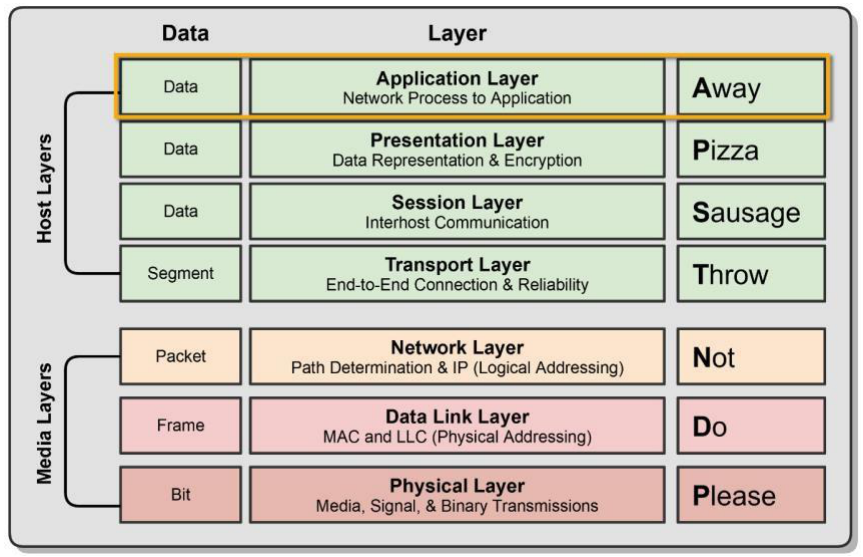
Layer 7 – Application Layer
- Where users interact with the computer
- Acts as an interface between an application and end-user protocols
- Provides an interface to communicate with the network (Outlook, Chrome, etc.)
- Applications don't reside in the application layer but instead interface with application-layer protocols
- Example Protocols:
- E-Mail: IMAP4, POP3, SMTP
- Web Browsers: HTTP, HTTPS
- Remote Access: SSH, Telnet
- Real-World Examples:
- Opening https://google.com in Chrome → uses HTTPS (port 443)
- Sending an email via Gmail → uses SMTP (port 587) to send, IMAP (port 993) to receive
- Connecting to a remote server via PuTTY → uses SSH (port 22)
- Transferring files to a web server → uses FTP (port 21) or SFTP (port 22)
- Resolving "google.com" to an IP address → uses DNS (port 53)
OSI Layer 6
The Presentation Layer
Layer 6 – Presentation Layer
- Ensures data transferred from one system's Application Layer can be read by the Application Layer on another
- Provides character code conversion, data compression, and data encryption/decryption
- Real-World Examples:
- Visiting a website over HTTPS → TLS/SSL encrypts data at the Presentation Layer before sending
- Uploading a JPEG photo to Instagram → image is compressed/formatted so any device can display it
- Streaming a video on YouTube → video is encoded in MPEG/H.264 and decoded by your browser
- Opening a Word document on Mac that was created on Windows → character encoding (e.g. UTF-8) ensures text displays correctly
- Compressing a file into a .zip before emailing → data compression handled at this layer
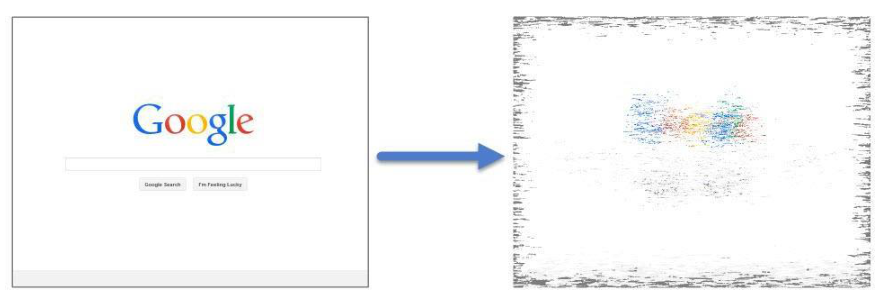
Layer 6 – File Formats
- Web Browser: HTML, XML, JavaScript
- Graphics Files: JPEG, GIF, PNG
- Audio/Video: MPEG, MP3
- Encryption: TLS, SSL
- Text/Data: ASCII, EBCDIC
OSI Layer 5
The Session Layer
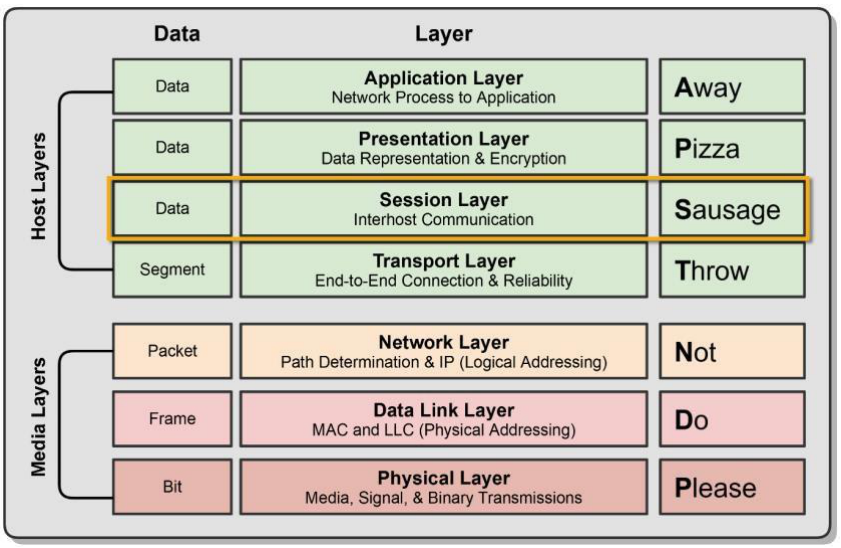
Layer 5 – Session Layer
- Responsible for setting up, managing, and tearing down sessions between network devices
- Ensures data from different application sessions are kept separate
- Utilises Application Program Interfaces (APIs) to communicate with TCP/IP protocols
- Coordinates communication between systems
- Start, Stop, Restart
- Real-World Examples:
- Logging into Netflix and streaming a movie → the Session Layer keeps your stream active and separate from other users
- A video call on Zoom → the session is established, maintained throughout the call, and torn down when you hang up
- Opening multiple tabs in Chrome → each tab maintains its own separate session with different websites
- Resuming a failed file download → the session layer can restart the transfer from where it left off
- Using NetBIOS to discover shared printers on a local network → session is created between your PC and the printer

Communication Modes
- Simplex: One-way communication between two devices, like listening to a radio station
- e.g. TV broadcast, FM radio, keyboard sending input to computer
- Half Duplex: Two-way communication, but only one device can communicate at a time
- e.g. Walkie-talkies (push-to-talk), CB radio, older Wi-Fi standards
- Full Duplex: Two-way communication where both sides can communicate at the same time
- e.g. Phone call (both parties talk simultaneously), Ethernet over twisted-pair cables, video call on Zoom
Quiz: Upper Layers (7, 6, 5)
Which OSI layer is responsible for data encryption and compression?
What type of communication allows both devices to send data at the same time?
OSI Layer 4
The Transport Layer
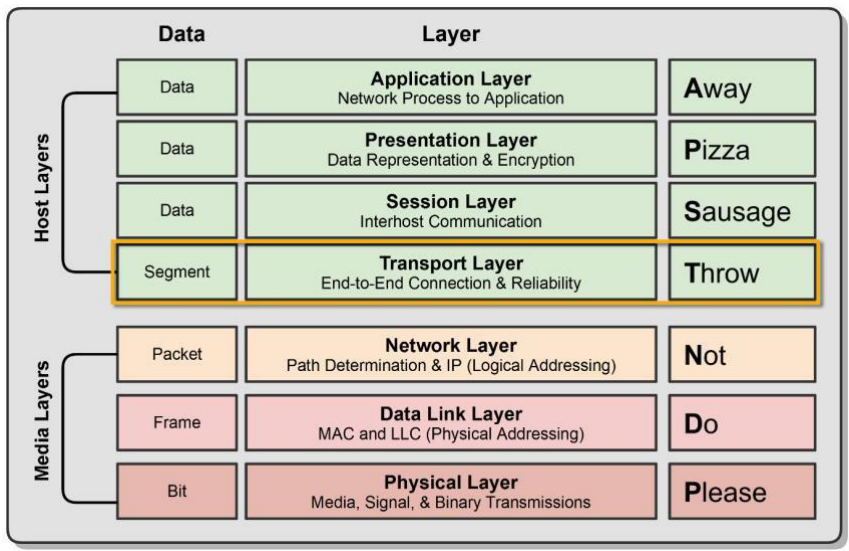
Layer 4 – Transport Layer
- Ensures data is delivered error-free and in sequence
- Segments data and reassembles correctly
- Can be connection-oriented or connectionless
- Considered the "Post Office" Layer
- TCP (Transmission Control Protocol)
- UDP (User Datagram Protocol)
- Real-World Examples:
- Loading a webpage → TCP ensures all HTML, CSS, and images arrive complete and in order
- Sending an email → TCP guarantees the message is delivered reliably without missing data
- Streaming a live game on Twitch → UDP is used for speed; a few lost frames are acceptable
- Online gaming (e.g. Fortnite) → UDP sends rapid position updates; low latency matters more than perfection
- Voice over IP (VoIP) phone call → UDP keeps the conversation in real-time without waiting for retransmissions
Layer 4 – Flow Control
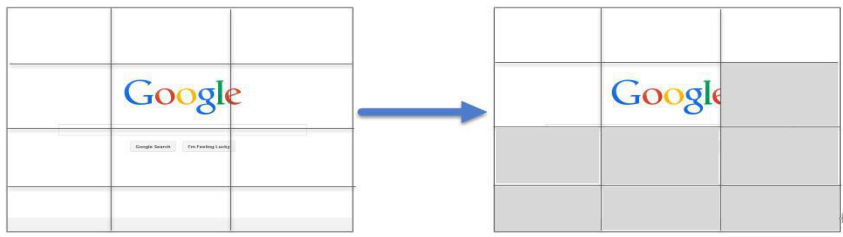
Responsible for two data flow control measures:
- Buffering
- Stores data in memory buffers until destination device is available
- Windowing
- Allows devices in session to determine the "window" size of data segments sent
- Real-World Examples:
- Downloading a large file → Buffering stores incoming chunks in memory while the disk writes catch up
- Streaming a YouTube video → the progress bar loads ahead using buffering so playback stays smooth
- A fast server sending to a slow IoT device → Windowing shrinks the segment size so the device isn't overwhelmed
- TCP "slow start" on a new connection → the window begins small and grows as the network proves it can handle more
- A printer receiving a large document → Buffering queues pages in memory so the sender doesn't have to wait for each page to print
OSI Layer 3
The Network Layer
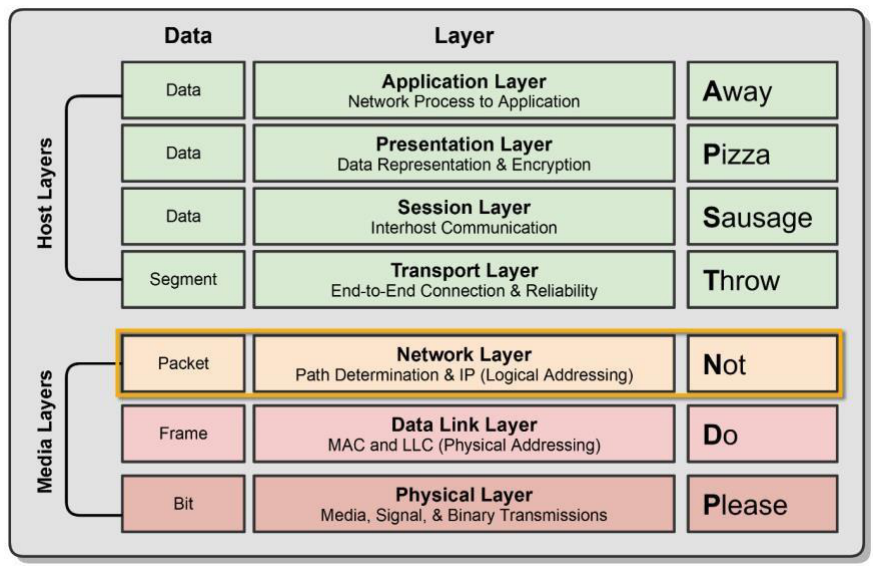
Layer 3 – Network Layer
- The "Routing" Layer
- Provides logical addressing (IP Addressing) and routing services
- Places two IP addresses into a packet:
- Source Address & Destination IP Address
- Internet Protocol (IP)
- The primary network protocol used on the Internet
- IPv4, IPv6 Logical Addresses
- Real-World Examples:
- Your laptop gets an IP address (e.g. 192.168.1.10) from the router so it can be identified on the network
- A home router decides the best path to forward your Google search from your LAN to the Internet
- Typing a URL → DNS returns an IP address, and the Network Layer uses it to route your request across multiple networks

Layer 3 – Packets & Devices
Types of Packets
- Data Packets – Routed IP data (IPv4 & IPv6)
- Route-Update Packets – Routing protocols (RIP, OSPF, EIGRP)
Layer 3 Devices & Protocols
- Routers & Multi-Layer Switches
- IPv4 & IPv6
- ICMP (e.g. Ping)
Quiz: Transport & Network Layers
Which Transport Layer protocol is connection-oriented and ensures reliable delivery?
What Layer 3 address does a router use to forward packets?
OSI Layer 2
The Data Link Layer
Layer 2 – Data Link Layer
- The "Switching" Layer
- Ensures messages are delivered to the proper device on a LAN using hardware addresses
- MAC (Media Access Control) Address
- Only concerned with local delivery of frames on the same network
- Responsible for packaging data into frames for the Physical Layer
- Translates messages from the Network Layer into bits for the Physical Layer
- Real-World Examples:
- Your laptop's MAC address (e.g. AA:BB:CC:DD:EE:FF) uniquely identifies its network card on the local network
- A network switch reads MAC addresses to forward frames only to the correct port, not the entire network
- An Ethernet frame wraps your IP packet with source and destination MAC addresses before it hits the cable

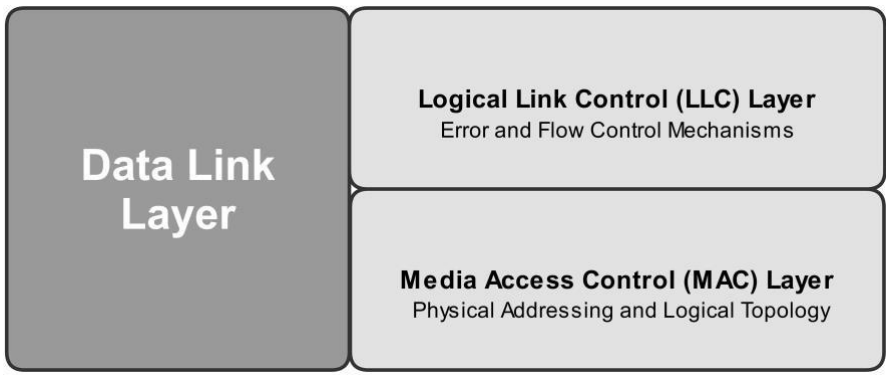
Layer 2 – Sub-Layers
LLC (Logical Link Control)
- Error Control and Flow Control
- Detect and correct corrupted data frames
- Limits amount of data sent so devices aren't overwhelmed
MAC (Media Access Control)
- Physical Addressing (48-bit MAC Address burned on NIC)
- Logical Topology & Media Access
- Ethernet, Token Ring, CSMA/CD & CSMA/CA
- Real-World Examples:
- LLC: When a Wi-Fi frame arrives corrupted, the LLC sub-layer detects the error and requests retransmission
- LLC: On a busy network, LLC flow control slows down a fast server so a slower printer's buffer doesn't overflow
- MAC: Every network card has a unique 48-bit address (e.g.
00:1A:2B:3C:4D:5E) burned in at the factory - MAC: Wired Ethernet uses CSMA/CD — if two devices transmit at once, they detect the collision and retry after a random delay
- MAC: Wi-Fi uses CSMA/CA — devices listen first and wait for a clear channel before transmitting to avoid collisions
OSI Layer 1
The Physical Layer
Layer 1 – Physical Layer
- Defines the physical and electrical medium for network communication:
- Sending and receiving bits (1 or 0)
- Encoding Signal Types – Electricity, radio waves, light
- Network Cabling, Jacks, Patch Panels – Copper or Fiber
- Physical Network Topology – Star, Mesh, Ring, etc.
- Ethernet IEEE 802.3 Standard
- Layer 1 Equipment: Hubs, Media Converters, Modems
- Responsible for the network hardware and physical topology
Quiz: Data Link & Physical Layers
What type of address does Layer 2 use to deliver frames?
Which OSI layer is responsible for the physical cabling and signal encoding?
OSI Model Summary
| Layer | Name | PDU | Key Function | Example |
|---|---|---|---|---|
| 7 | Application | Data | User interface & protocols | HTTP, SMTP, SSH |
| 6 | Presentation | Data | Format, encrypt, compress | SSL/TLS, JPEG, ASCII |
| 5 | Session | Data | Manage sessions | APIs, NetBIOS |
| 4 | Transport | Segment | Reliable delivery | TCP, UDP |
| 3 | Network | Packet | Logical addressing & routing | IP, ICMP, OSPF |
| 2 | Data Link | Frame | Physical addressing | Ethernet, MAC |
| 1 | Physical | Bit | Signal transmission | Cables, Hubs |
Data Encapsulation
and De-Encapsulation
Data Encapsulation
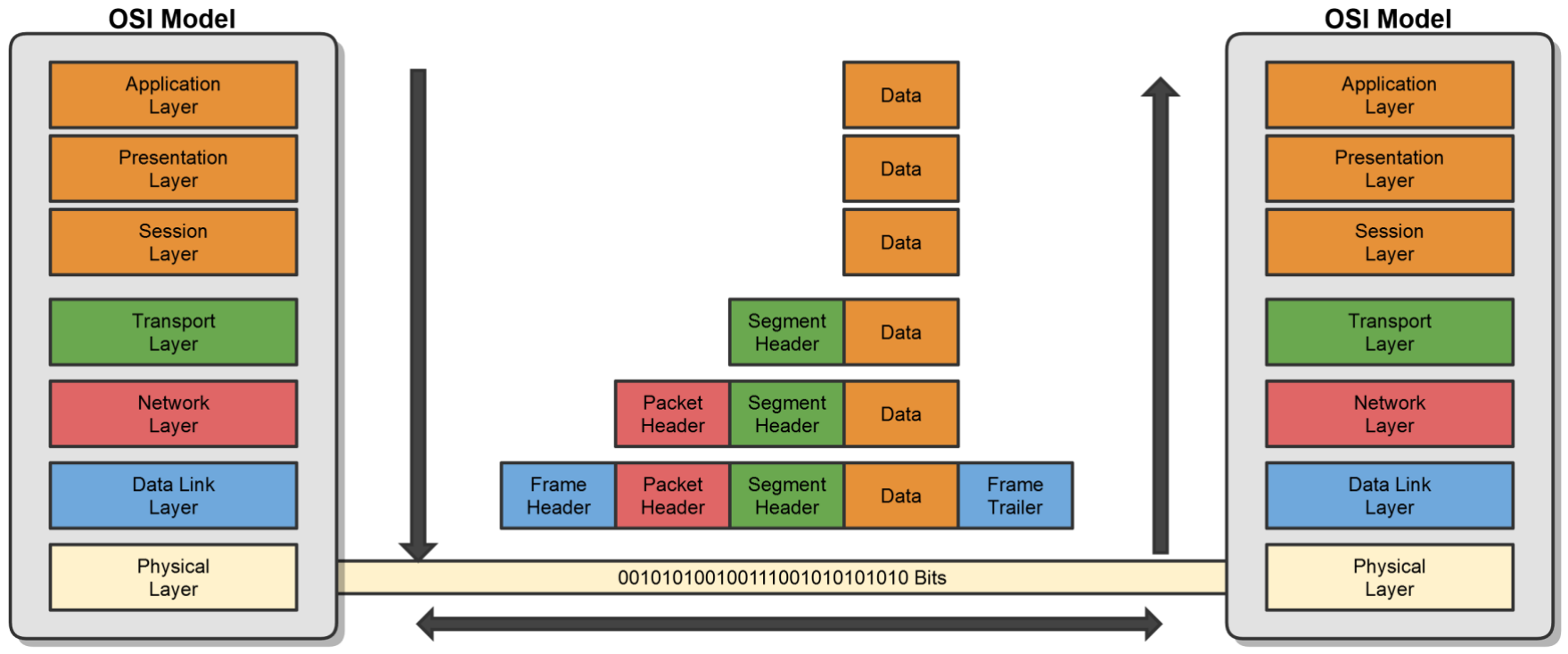
As data moves down the OSI model, each layer adds its own header (and sometimes trailer):
🤔 Discussion Questions
- What type of address do you expect to find in the L2 Header? [Show Answer] → MAC Address (physical address)
- What type of address would the L3 Header contain? [Show Answer] → IP Address (logical address)
- What information might the L4 Header include to identify the application? [Show Answer] → Port numbers (e.g. 80 for HTTP, 443 for HTTPS)
- As data moves down the layers, does the total size get bigger or smaller? Why? [Show Answer] → Bigger — each layer wraps the data with additional header information (overhead)
Physical vs Logical Flow
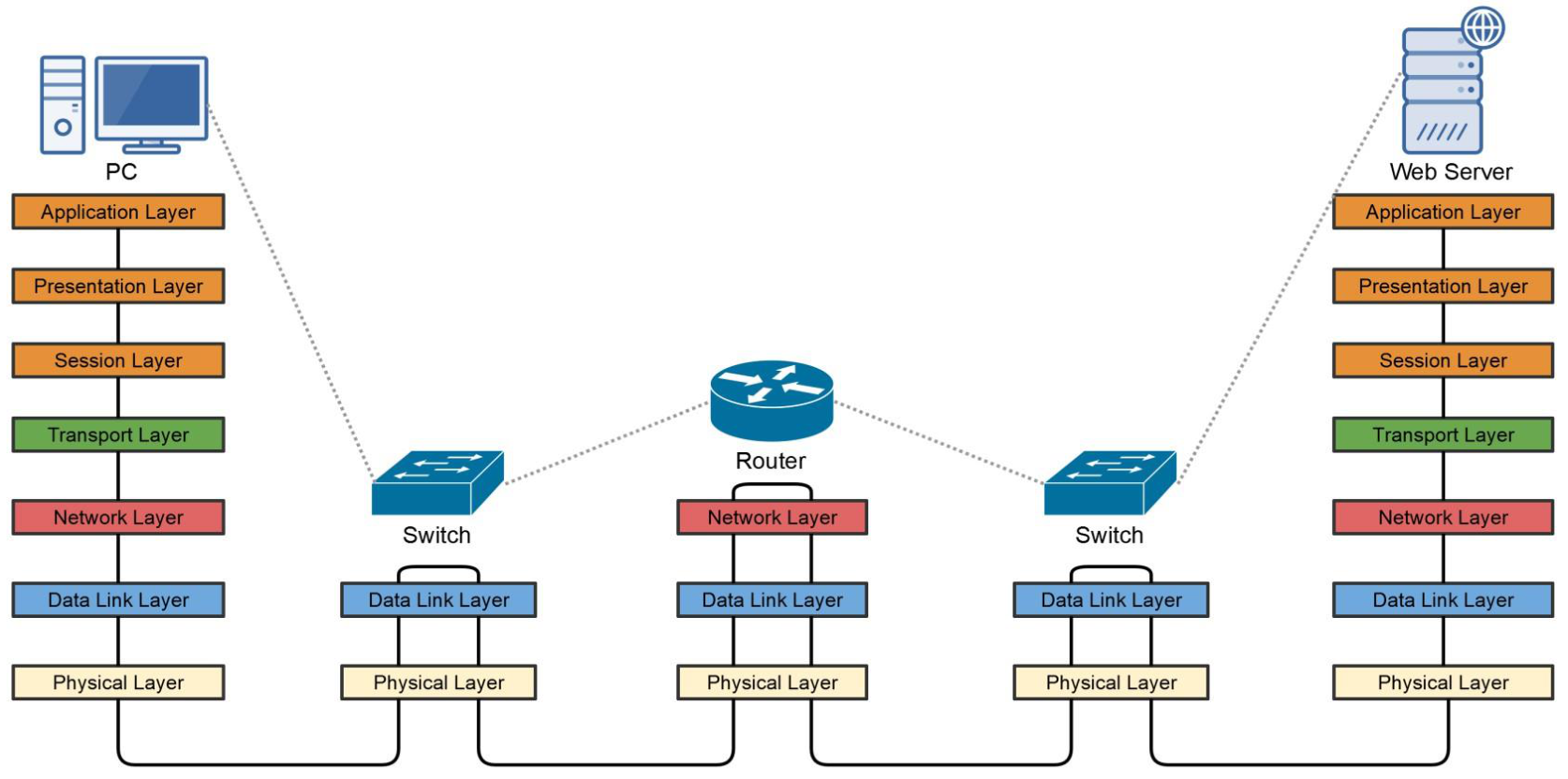
Data travels down the OSI layers on the sending device, across the physical medium, through intermediary devices (switches at Layer 2, routers at Layer 3), and then up the layers on the receiving device.
Quiz: Encapsulation & the OSI Model
What is the PDU (Protocol Data Unit) at Layer 4?
During encapsulation, what does Layer 2 add to a packet?
Which mnemonic helps remember the OSI layers from Layer 7 to 1?
Understanding IPv4 Addresses
& Binary Math
Understanding IPv4 Addresses
- An IP Address is a logical address used to uniquely identify a device on an IP network
- It's a Network Layer address (Layer 3 of the OSI Model)
- There are two versions:
- IP version 4 (IPv4)
- IP version 6 (IPv6)
- This lesson focuses on IPv4 — we'll discuss IPv6 later in the course
IPv4 Address Anatomy
- Made up of 32 binary bits, divided into a network portion and a host portion with the help of a subnet mask
- The 32 binary bits are broken into four octets (1 octet = 8 bits)
- Each octet is converted to decimal and separated by a period (dot)
- An IP address is expressed in dotted decimal format
↕ Each octet = 8 bits = 1 byte
32 bits = 4 bytes = 4 octets
IPv4 Address Breakdown
Breaking down the address 192.168.1.131 into its four octets:
| Octet 1 | Octet 2 | Octet 3 | Octet 4 | |
|---|---|---|---|---|
| Decimal | 192 | 168 | 1 | 131 |
| Binary | 11000000 |
10101000 |
00000001 |
10000011 |
| Bits | 8 bits | 8 bits | 8 bits | 8 bits |
Network & Host Portion
An IP address is broken into two parts:
Network Address
- Uniquely identifies each network
- Like your Street Name:
99 Albert Street
Host Address
- Uniquely identifies each machine on a network
- Like your House Number:
99 Albert Street
Network Address + Host Address = IP Address
IPv4 Address Components
Each device on a network is assigned:
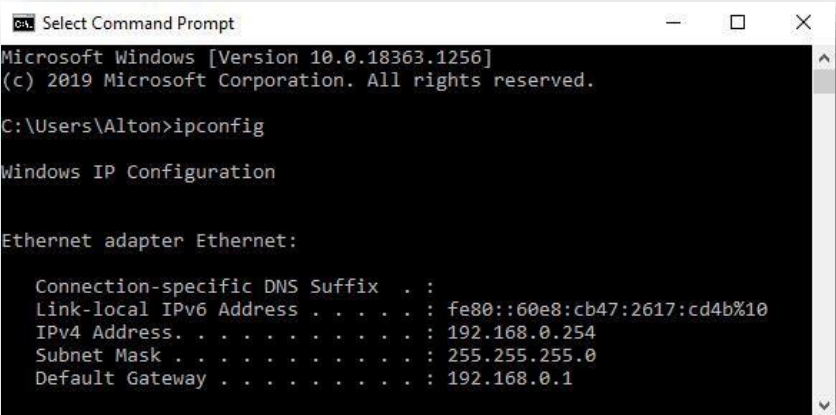
- IP Address: Unique logical address assigned to each device on a network
- Subnet Mask: Used by the device to determine what subnet it's on — specifically the network and host portions of the IP address
- Default Gateway: The IP address of a network's router that allows devices on the local network to communicate with other networks
Quiz: IPv4 Basics
How many bits make up an IPv4 address?
Which component tells a device what subnet it belongs to?
Binary Math Basics
Converting between Binary and Decimal
Basics of Binary Math
Lecture Goals
- Convert Binary to Decimal
- Convert Decimal to Binary
Why Is It Important?
- We need to know basic binary math to perform subnetting
- Essential to understand how IPv4 addresses work
Remember This:
128 + 64 + 32 + 16 + 8 + 4 + 2 + 1 = 255
Binary → Decimal: 11111111
Add the value where there is a "1". Add zero when there is a "0".
| 27 = 128 | 26 = 64 | 25 = 32 | 24 = 16 | 23 = 8 | 22 = 4 | 21 = 2 | 20 = 1 |
|---|---|---|---|---|---|---|---|
| 1 | 1 | 1 | 1 | 1 | 1 | 1 | 1 |
| 128 | 64 | 32 | 16 | 8 | 4 | 2 | 1 |
| 128 + 64 + 32 + 16 + 8 + 4 + 2 + 1 = 255 | |||||||
Binary → Decimal: 10101010
Add the value where there is a "1". Add zero when there is a "0".
| 27 = 128 | 26 = 64 | 25 = 32 | 24 = 16 | 23 = 8 | 22 = 4 | 21 = 2 | 20 = 1 |
|---|---|---|---|---|---|---|---|
| 1 | 0 | 1 | 0 | 1 | 0 | 1 | 0 |
| 128 | 0 | 32 | 0 | 8 | 0 | 2 | 0 |
| 128 + 0 + 32 + 0 + 8 + 0 + 2 + 0 = 170 | |||||||
Binary → Decimal: 10000011
Add the value where there is a "1". Add zero when there is a "0".
| 27 = 128 | 26 = 64 | 25 = 32 | 24 = 16 | 23 = 8 | 22 = 4 | 21 = 2 | 20 = 1 |
|---|---|---|---|---|---|---|---|
| 1 | 0 | 0 | 0 | 0 | 0 | 1 | 1 |
| 128 | 0 | 0 | 0 | 0 | 0 | 2 | 1 |
| 128 + 0 + 0 + 0 + 0 + 0 + 2 + 1 = 131 | |||||||
Quiz: Binary to Decimal
What is the decimal value of binary 11001100?
What is the decimal value of binary 01100100?
Decimal → Binary
Converting Decimal Numbers to Binary
Decimal → Binary: 192
Divide by 2 repeatedly. The remainders (read bottom → top) give the binary number:
| Division | Quotient | Remainder |
| 192 ÷ 2 | 96 | 0 |
| 96 ÷ 2 | 48 | 0 |
| 48 ÷ 2 | 24 | 0 |
| 24 ÷ 2 | 12 | 0 |
| 12 ÷ 2 | 6 | 0 |
| 6 ÷ 2 | 3 | 0 |
| 3 ÷ 2 | 1 | 1 |
| 1 ÷ 2 | 0 | 1 |
Read remainders ↑ bottom to top: 11000000
| 128 | 64 | 32 | 16 | 8 | 4 | 2 | 1 |
|---|---|---|---|---|---|---|---|
| 1 | 1 | 0 | 0 | 0 | 0 | 0 | 0 |
| 128 ✓ | 64 ✓ | – | – | – | – | – | – |
| 128 + 64 = 192 → 11000000 | |||||||
Decimal → Binary: 202
Start adding the values from left to right until you reach the target decimal!
| 128 | 64 | 32 | 16 | 8 | 4 | 2 | 1 |
|---|---|---|---|---|---|---|---|
| 1 | 1 | 0 | 0 | 1 | 0 | 1 | 0 |
| 128 ✓ | 64 ✓ | – | – | 8 ✓ | – | 2 ✓ | – |
| 128 + 64 + 8 + 2 = 202 → 11001010 | |||||||
Decimal → Binary: 54
Start adding the values from left to right until you reach the target decimal!
| 128 | 64 | 32 | 16 | 8 | 4 | 2 | 1 |
|---|---|---|---|---|---|---|---|
| 0 | 0 | 1 | 1 | 0 | 1 | 1 | 0 |
| – | – | 32 ✓ | 16 ✓ | – | 4 ✓ | 2 ✓ | – |
| 32 + 16 + 4 + 2 = 54 → 00110110 | |||||||
Quiz: Decimal to Binary
What is 240 in binary?
What is 172 in binary?
IP Address Conversion Process
Whether given an IP in dotted-decimal or binary, convert each octet one by one:
| Octet 1 | Octet 2 | Octet 3 | Octet 4 | |
|---|---|---|---|---|
| Decimal | 192 | 168 | 32 | 4 |
| Binary | 11000000 |
10101000 |
00100000 |
00000100 |
192.168.32.4 = 11000000.10101000.00100000.00000100
Interactive: Binary ↔ Decimal Converter
Click each bit to toggle it ON (1) or OFF (0):
Binary
00000000
Decimal
0