Introduction to Networks
Week 5 — IPv4 Addressing & Subnetting
Reza Farashahi — NZSE
IP Address Classification
Classes, Subnet Masks & CIDR
IPv4 Address Classes (Simplified)
| Class | Network Bits | Host Bits | Address Range |
|---|---|---|---|
| A | 8 | 24 | 1.0.0.0 – 126.255.255.255 |
| B | 16 | 16 | 128.0.0.0 – 191.255.255.255 |
| C | 24 | 8 | 192.0.0.0 – 223.255.255.255 |
- The first octet determines the class
- Class A = large networks, Class C = small networks
Network & Host Bits
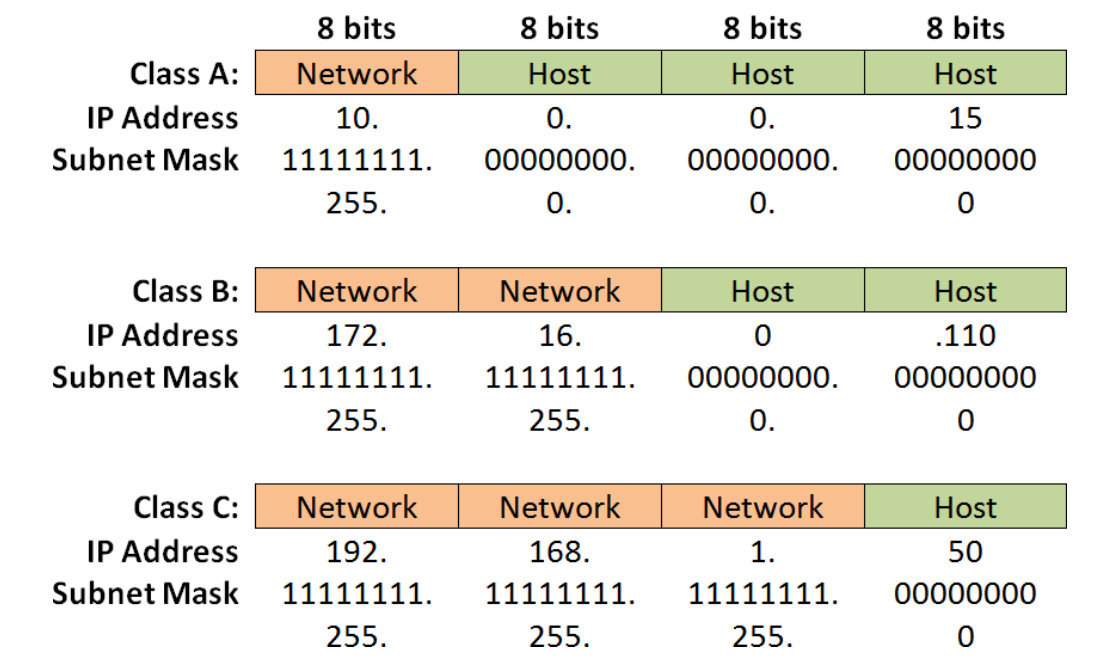
Every IPv4 address has 32 bits, divided into a network portion and a host portion:
Class A:
Class B:
Class C:
IPv4 Address Classes (Detailed)
| Class | Leading Bits | Net Bits | Host Bits | # Networks | Hosts/Network | Default Mask |
|---|---|---|---|---|---|---|
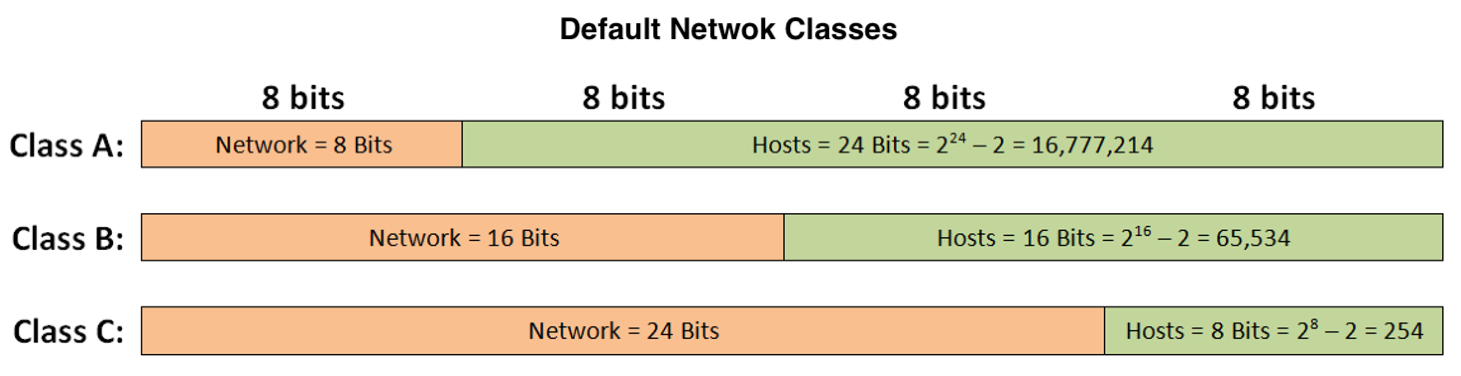
| A | 0 (1–126) | 8 | 24 | 128 (27) | 16,777,216 (224) | 255.0.0.0 |
| B | 10 (128–191) | 16 | 16 | 16,384 (214) | 65,536 (216) | 255.255.0.0 |
| C | 110 (192–223) | 24 | 8 | 2,097,152 (221) | 256 (28) | 255.255.255.0 |
| D | 1110 (224–239) | Multicast — not used for host addressing | ||||
| E | 1111 (240–255) | Reserved / Experimental | ||||
Default Subnet Masks
- The subnet mask tells you which portion of the IP address identifies the network and which identifies the host
| Class | Default Subnet Mask | Binary |
|---|---|---|
| A | 255.0.0.0 | 11111111.00000000.00000000.00000000 |
| B | 255.255.0.0 | 11111111.11111111.00000000.00000000 |
| C | 255.255.255.0 | 11111111.11111111.11111111.00000000 |
- 1s in the mask = network portion
- 0s in the mask = host portion
Let's Practice — What Class?
1. IP: 9.10.40.15 / Mask: 255.0.0.0
2. IP: 135.240.110.100 / Mask: 255.255.0.0
3. IP: 196.200.10.5 / Mask: 255.255.255.0
CIDR Notation
- CIDR = Classless Inter-Domain Routing
- Uses "slash" notation to indicate how many bits belong to the subnet mask
- A shortcut for writing the full subnet mask:
| CIDR | Binary Mask | Decimal Mask |
|---|---|---|
| /8 | 11111111.00000000.00000000.00000000 | 255.0.0.0 |
| /16 | 11111111.11111111.00000000.00000000 | 255.255.0.0 |
| /24 | 11111111.11111111.11111111.00000000 | 255.255.255.0 |
| /25 | 11111111.11111111.11111111.10000000 | 255.255.255.128 |
192.168.1.0/24= mask 255.255.255.010.1.0.0/16= mask 255.255.0.0196.10.10.0/25= mask 255.255.255.128
The Power of 2
Essential for IP Addressing & Subnetting
How Many Unique Combinations?
Q1: How many unique combinations can you make with 2 bits?
Hint: Think about all the possible values — 00, 01, 10, 11…
Q2: How many unique combinations can you make with 3 bits?
Hint: Each extra bit doubles the possibilities.
Understanding the Power of 2
- We use the power of 2 in IP addressing and subnetting
- It's important to memorize these values
| Power | Value | Power | Value |
|---|---|---|---|
| 21 | 2 | 27 | 128 |
| 22 | 4 | 28 | 256 |
| 23 | 8 | 29 | 512 |
| 24 | 16 | 210 | 1,024 |
| 25 | 32 | 211 | 2,048 |
| 26 | 64 | 212 | 4,096 |
Hosts Per Network = 2h − 2
- h = number of host bits available
- We subtract 2 because each network reserves:
- Network address (all host bits = 0)
- Broadcast address (all host bits = 1)
| Class | Host Bits (h) | Formula | Usable Hosts |
|---|---|---|---|
| A | 24 | 224 − 2 | 16,777,214 |
| B | 16 | 216 − 2 | 65,534 |
| C | 8 | 28 − 2 | 254 |
Public vs Private IP Addresses
Public vs Private IP Addresses
Public IP Addresses
- "Registered" — globally unique
- Assigned by an ISP
- Used by web servers, DNS servers, routers
- By the early 1990s, the world was running out!
Private IP Addresses
- "Unregistered" — free for anyone
- Used within private internal networks
- Can be reused across different networks
- Cannot be routed on the public Internet
- Uses NAT (Netwrok Address Translation) to reach the Internet
Private IP Address Ranges
| Class | IP Address Range | CIDR | Addresses/Network |
|---|---|---|---|
| A | 10.0.0.0 – 10.255.255.255 | 10.0.0.0/8 | 16,777,216 |
| B | 172.16.0.0 – 172.31.255.255 | 172.16-31.0.0/16 | 65,534 |
| C | 192.168.0.0 – 192.168.255.255 | 192.168.0-255.0/24 | 254 |
- Real-World Examples:
- Your home router typically uses 192.168.1.0/24 or 192.168.0.0/24 (Private Class C)
- Large corporate networks often use 10.0.0.0/8 (Private Class A) for millions of internal devices
- Cloud providers like AWS use 172.16.0.0/12 ranges for Virtual Private Clouds
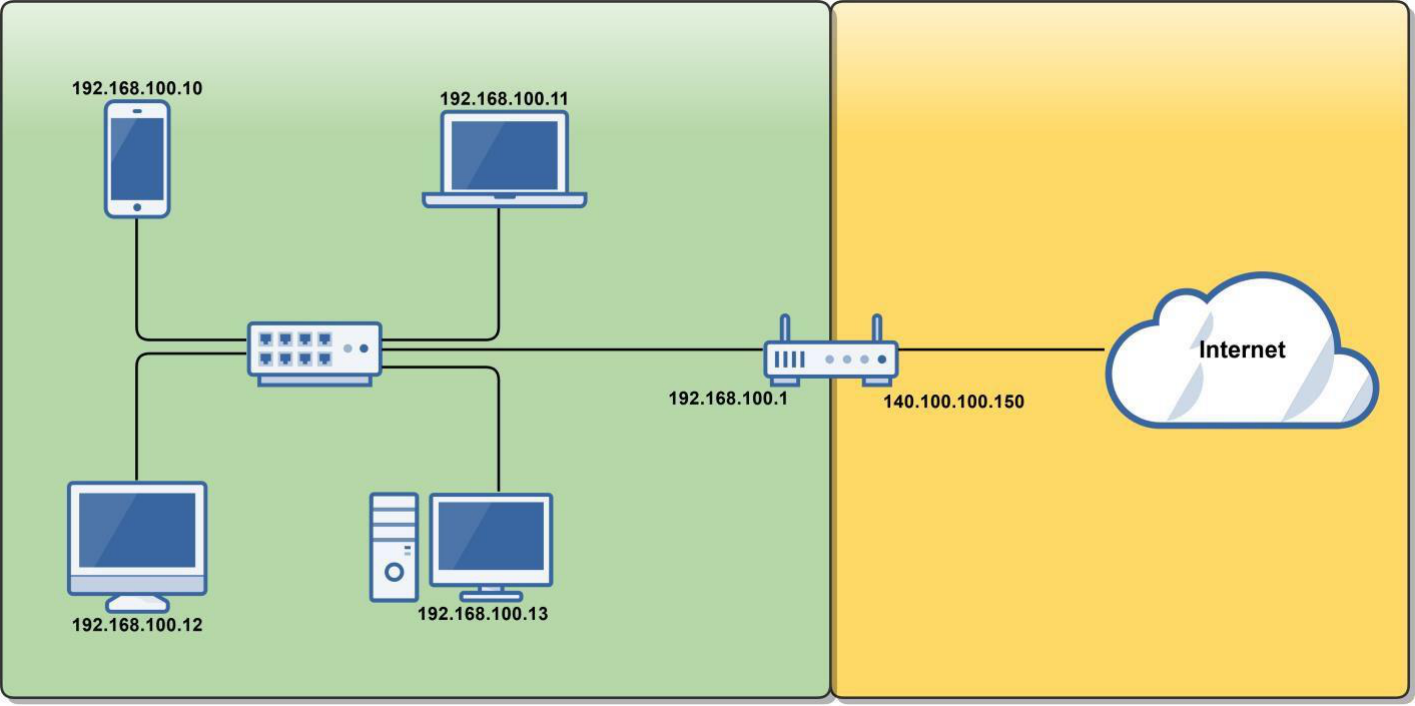
Public vs Private — Visualized
🏠 Private Network
Router Internal: 192.168.100.1
☁️ Public Internet
Router External: 140.100.100.150 (Public IP)
The Loopback Address
127.0.0.1 — localhost
The Loopback Address
- 127.0.0.0 – 127.255.255.255 is reserved for loopback (a host's own address)
- 127.0.0.1 is the default loopback address on most operating systems
- Used for diagnostics — checks that TCP/IP is correctly installed:
- The OS loops the packet back to itself without touching the NIC
- Data is forwarded to a virtual network interface inside the OS
- If you can ping it, TCP/IP is working:
ping 127.0.0.1ping localhostping loopback
Quiz: IPv4 Addressing
Q1: What is the default subnet mask for a Class B network?
Q2: Which IP address range is private Class A?
Q3: What does /24 in CIDR notation mean?
Introduction to Subnetting
Dividing Networks into Smaller Sub-Networks
Why Subnet?
- Using default Class A, B, and C subnets (Classful IP Addressing) is inefficient:
- Wastes unused IP addresses (especially public ones)
- Subnetting lets you create multiple logical networks within a single Class A, B, or C network:
- Breaks up larger networks into multiple smaller sub-networks (subnets)
- Allows more efficient routing via router summarization
- Increased network security — isolate departments, devices, or traffic
🏢 Analogy — The Office Building
Imagine a large open-plan office with 1,000 employees all in one room. Every time someone talks, everyone hears it — chaos! Now divide the building into floors and departments: HR on floor 1, Engineering on floor 2, Sales on floor 3. Each floor has its own reception desk (router), its own internal phone system (subnet), and only inter-floor calls go through the main switchboard. That's subnetting — smaller groups, less noise, better security, and easier management.
Fixed-Length Subnetting (FLSM)
- We will learn fixed-length subnet mask (FLSM) — all subnets are the same size
- There is also variable-length subnetting (VLSM), which is beyond the scope of this course
FLSM: Every subnet gets the same number of host addresses — simple and predictable
Class C Subnetting Example
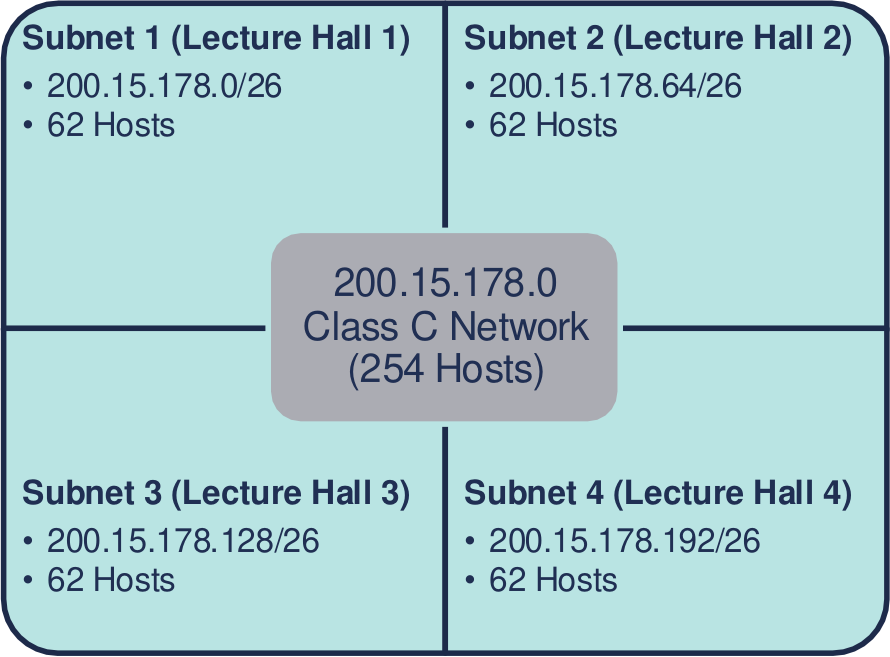
You're the network admin for a university's Computer Science department:
- 4 new lecture halls, each needing a 60-person wireless network
- Assigned: 200.15.178.0 — a Class C network (254 hosts by default)
- How do you split this one network into 4 smaller subnets?
200.15.178.0/26
62 hosts
200.15.178.64/26
62 hosts
200.15.178.128/26
62 hosts
200.15.178.192/26
62 hosts
Process of Subnetting
- We borrow host bits to create more sub-networks from a Class A, B, or C network
- When you borrow host bits:
- You create additional subnets
- You decrease the number of host addresses available per subnet
Class C example (24 network bits + 8 host bits):
After borrowing 2 bits:
How to Create Subnets
- Borrow bits from the host portion of an IP address
- Each bit borrowed doubles the number of subnets:
- Borrow 1 bit → 21 = 2 subnets
- Borrow 2 bits → 22 = 4 subnets
- Borrow 3 bits → 23 = 8 subnets
- Borrow 4 bits → 24 = 16 subnets
- Number of subnets = 2x where x = bits borrowed
Creating Subnets — Visualized
192.168.1.0/24
256 addresses · 254 usable hosts · 8 host bits
22 = 4 subnets · 26 − 2 = 62 hosts each · Block size = 64
23 = 8 subnets · 25 − 2 = 30 hosts each · Block size = 32
Subnetting Questions
To create a subnet, answer these two questions:
🔢
How many subnets do you need?
This determines how many bits to borrow
👥
How many hosts per subnet?
This determines how many host bits must remain
Class C — Possible Subnets
| Bits Borrowed (x) | Subnet Mask | CIDR | # Subnets (2x) | Block Size (2y) | Hosts (2y−2) |
|---|---|---|---|---|---|
| 1 | 255.255.255.128 | /25 | 2 | 128 | 126 |
| 2 | 255.255.255.192 | /26 | 4 | 64 | 62 |
| 3 | 255.255.255.224 | /27 | 8 | 32 | 30 |
| 4 | 255.255.255.240 | /28 | 16 | 16 | 14 |
| 5 | 255.255.255.248 | /29 | 32 | 8 | 6 |
| 6 | 255.255.255.252 | /30 | 64 | 4 | 2 |
- x = number of host bits borrowed to create subnets
- y = remaining host bits (y = 8 − x for Class C)
- Block size = 2y = the increment between subnet network addresses
Class B — Possible Subnets
| Bits Borrowed (x) | Subnet Mask | CIDR | # Subnets (2x) | Block Size (2y) | Hosts (2y−2) |
|---|---|---|---|---|---|
| 1 | 255.255.128.0 | /17 | 2 | 32,768 | 32,766 |
| 2 | 255.255.192.0 | /18 | 4 | 16,384 | 16,382 |
| 3 | 255.255.224.0 | /19 | 8 | 8,192 | 8,190 |
| 4 | 255.255.240.0 | /20 | 16 | 4,096 | 4,094 |
| 5 | 255.255.248.0 | /21 | 32 | 2,048 | 2,046 |
| 6 | 255.255.252.0 | /22 | 64 | 1,024 | 1,022 |
| 7 | 255.255.254.0 | /23 | 128 | 512 | 510 |
| 8 | 255.255.255.0 | /24 | 256 | 256 | 254 |
Class A — Possible Subnets
| Bits Borrowed (x) | Subnet Mask | CIDR | # Subnets (2x) | Block Size (2y) | Hosts (2y−2) |
|---|---|---|---|---|---|
| 1 | 255.128.0.0 | /9 | 2 | 8,388,608 | 8,388,606 |
| 2 | 255.192.0.0 | /10 | 4 | 4,194,304 | 4,194,302 |
| 4 | 255.240.0.0 | /12 | 16 | 1,048,576 | 1,048,574 |
| 8 | 255.255.0.0 | /16 | 256 | 65,536 | 65,534 |
| 12 | 255.255.240.0 | /20 | 4,096 | 4,096 | 4,094 |
| 16 | 255.255.255.0 | /24 | 65,536 | 256 | 254 |
Subnet Count: 2x
Where x = number of host bits borrowed:
| Bits Borrowed (x) | 2x | Subnets Created |
|---|---|---|
| 1 | 21 | 2 |
| 2 | 22 | 4 |
| 3 | 23 | 8 |
| 4 | 24 | 16 |
| 5 | 25 | 32 |
| 6 | 26 | 64 |
| 7 | 27 | 128 |
| 8 | 28 | 256 |
Hosts per Subnet: 2y − 2
Where y = host bits remaining:
| Host Bits (y) | Addresses (2y) | Usable Hosts (2y−2) |
|---|---|---|
| 2 | 4 | 2 |
| 3 | 8 | 6 |
| 4 | 16 | 14 |
| 5 | 32 | 30 |
| 6 | 64 | 62 |
| 7 | 128 | 126 |
| 8 | 256 | 254 |
| 10 | 1,024 | 1,022 |
| 12 | 4,096 | 4,094 |
Quiz: Subnetting
Q1: You need 4 subnets from a Class C network. How many bits must you borrow?
Q2: A /26 subnet mask gives you how many usable hosts per subnet?
Q3: What is the subnet mask for a /27 network?
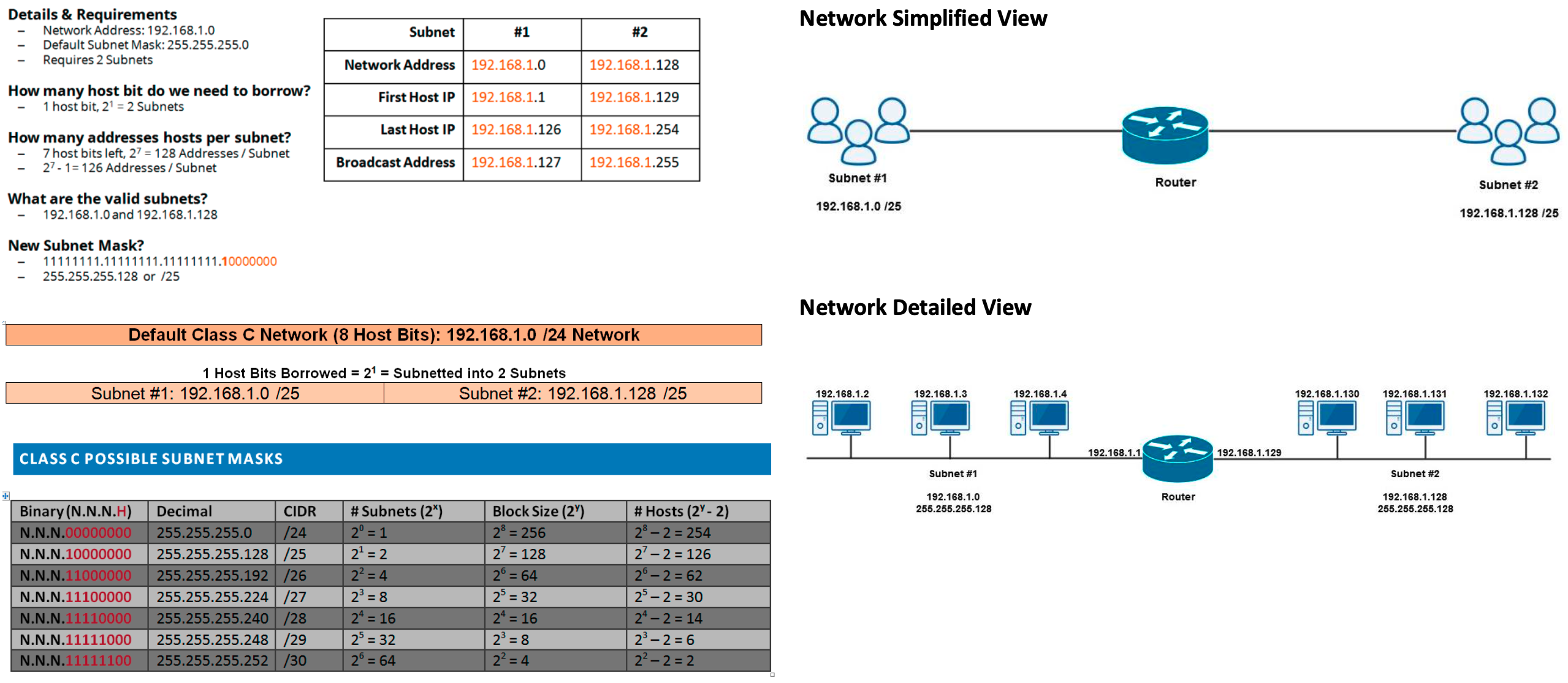
Subnetting Example
Details & Requirements
- Network Address:
192.168.1.0 - Default Subnet Mask:
255.255.255.0 - Requires: 2 Subnets
Questions to answer:
- How many host bits do we need to borrow?
- How many host addresses per subnet?
- What are the valid subnets?
- What is the new subnet mask?
- For each subnet, what is the:
- Network Address
- First Host IP
- Last Host IP
- Broadcast Address
Subnetting Example — Solution
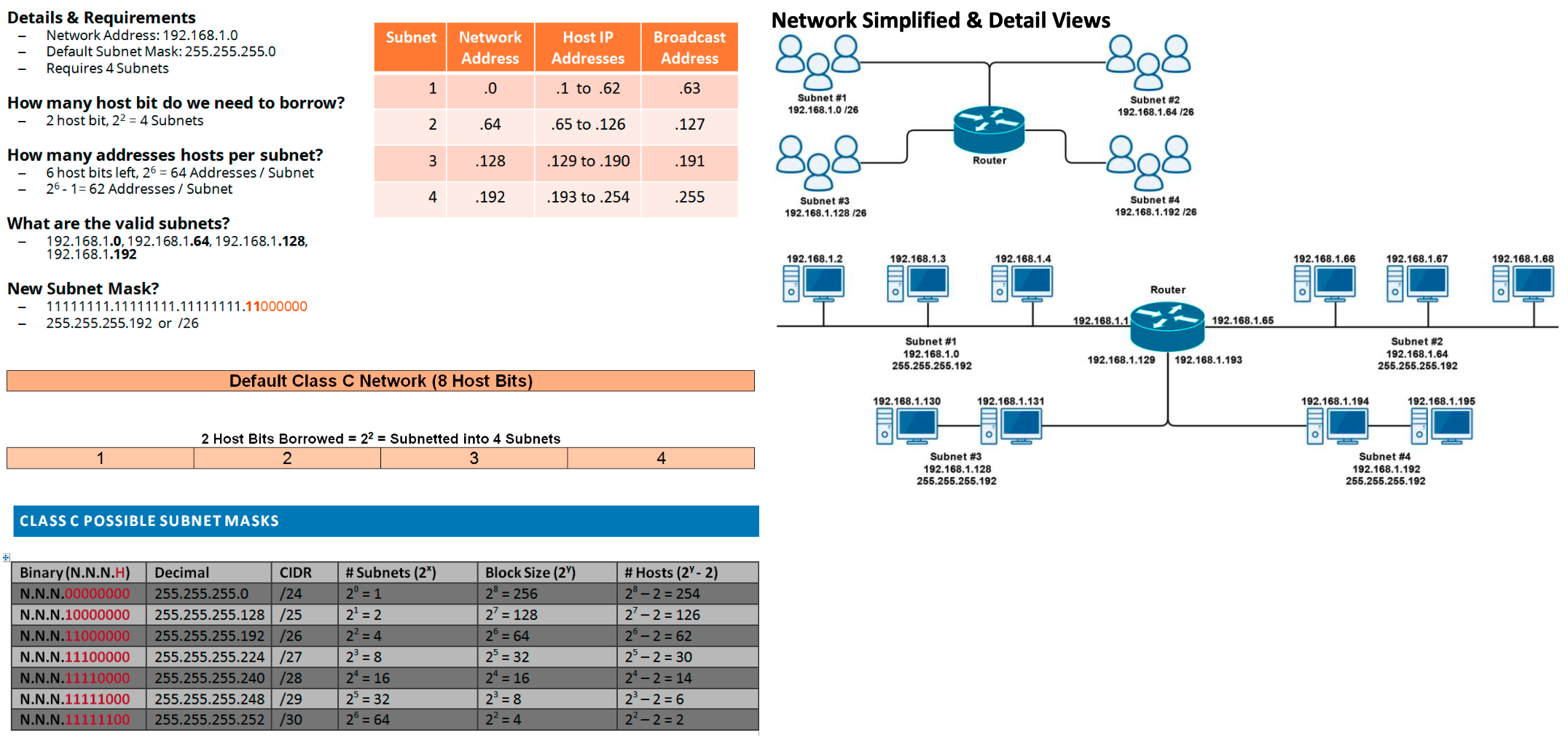
Subnetting Example 2
Details & Requirements
- Network Address:
192.168.1.0 - Default Subnet Mask:
255.255.255.0 - Requires: 4 Subnets
Questions to answer:
- How many host bits do we need to borrow?
- How many addresses/hosts per subnet?
- What are the valid subnets?
- What is the new subnet mask?
- For each subnet, what is the:
- Network Address
- Host IP Range
- Broadcast Address
Subnetting Example 2 — Solution
Week 5 — Summary
Session 1: IPv4 Addressing
- IPv4 address classes (A, B, C, D, E)
- Network bits vs host bits
- Default subnet masks
- CIDR / slash notation
- Power of 2 in networking
- Hosts per network = 2h − 2
- Public vs private IP addresses
- Private ranges (10.x / 172.16-31.x / 192.168.x)
- The loopback address (127.0.0.1)
Session 2: Subnetting
- Why subnet? Efficiency, security, routing
- Fixed-length subnet mask (FLSM)
- Borrowing host bits to create subnets
- Number of subnets = 2x
- Hosts per subnet = 2y − 2
- Block size = 2y
- Class C, B, and A subnet tables